Outstanding quality of music One Page Template


Edit Template Offline
2. Create new page and search for id 17189
Edit Template Online
Create Awesome Websites


Free Nicepage Builder
Keywords
Distinct product destinations remain connected on one page
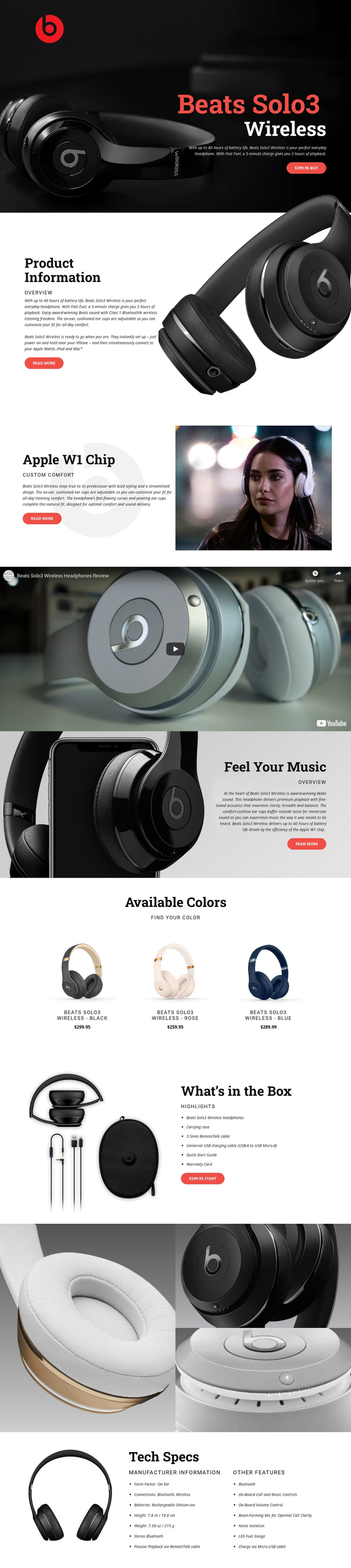
The page’s section order supports a continuous product journey without requiring the information to be split into separate documents. The opening hero provides the first destination for product recognition and purchase, while Product Information gives visitors a broader overview. The Apple W1 Chip and custom comfort section then narrows the focus to a particular feature before the full-width video creates a noticeable transition in the page rhythm.
Further down, Feel Your Music offers another destination centered on sound, comfort, and battery content. The Available Colors grid changes from explanatory copy to a repeated comparison area with three variants: black, rose, and blue. That change in format helps visitors understand where to look for choice information. The What’s in the Box section provides a separate practical destination, pairing an accessories image with a list of included items and another purchase action.
The closing gallery and Tech Specs area complete the continuous document with visual and reference content. Three close-up images allow product details to be viewed together, while the final specifications organize form factor, Bluetooth and wireless connections, rechargeable battery information, dimensions, weight, and other features. These sections can be treated as meaningful destinations within a single page journey. The design’s value as a One Page Template comes from the way several types of product information remain available in sequence without breaking the visitor’s context.
Customize with Nicepage
Open this ready-made template in the One Page Template Builder and customize it visually in the Nicepage editor. Replace demo content, edit page sections, and adapt the design to your project without rebuilding the template from scratch.
Build a Navigable One-Page Website
Connect the Menu to Page Sections
Organize the website as a sequence of sections on a single page and use the Menu For One-Page Site to connect menu items with individual page Blocks. Visitors can jump directly to sections such as About, Services, Testimonials, or Contact without opening separate pages.
Keep the Website on One URL
A one-page template can combine several parts of a small website within one continuous page. Arrange the Header, introduction, services, portfolio, company information, reviews, contact details, and other relevant sections in the order that fits the project while keeping them accessible through the same page navigation.
Make Long Pages Easier to Navigate
For longer one-page websites, keep navigation labels short and connected to meaningful sections so visitors can move through the page without relying only on scrolling. You can also use the Back To Top element to provide a quick way back to the beginning after longer sections.
This workflow makes the template suitable for compact websites that need several distinct content sections while keeping the complete visitor experience on one URL.