Modern Football Team One Page Template


Edit Template Offline
2. Create new page and search for id 6627711
Edit Template Online
Create Awesome Websites


Free Nicepage Builder
Keywords
Fixtures, Standings, Squad, and Training Create a Continuous Club Journey
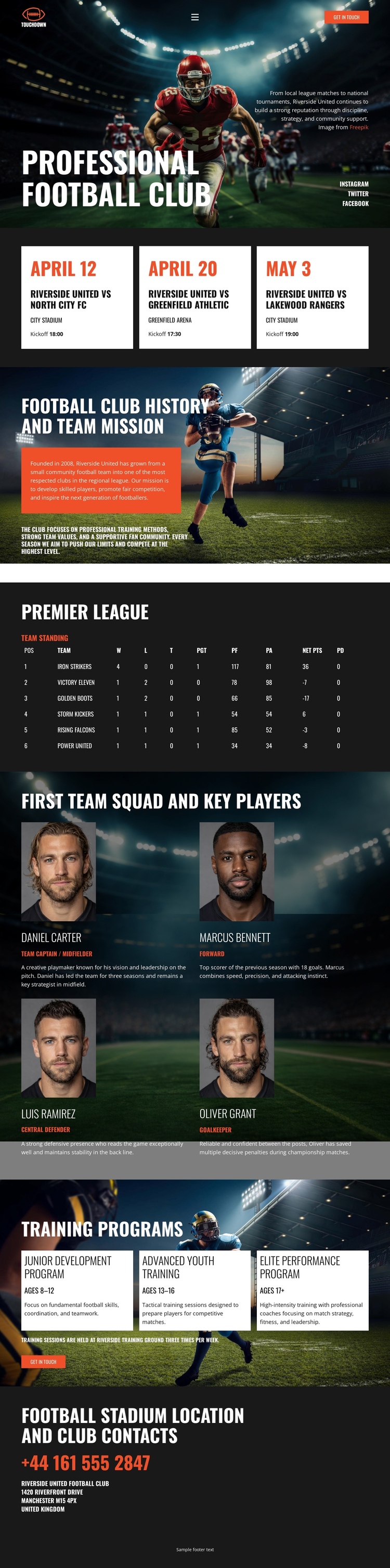
The page offers several meaningful destinations without requiring the visitor to leave the document. The opening club introduction establishes the subject, while the fixture grid provides an early destination for supporters interested in upcoming matches. History and mission content follows as a separate identity section, changing the visitor’s focus from what is happening next to why the club exists and what it represents.
The Premier League standings table creates a compact performance destination, followed by the first-team squad section with four player profiles. This sequence moves from league context to individual people, allowing the page to present club information at different levels. The training programs then introduce three development destinations for junior, advanced youth, and elite performance interests. Because each group has its own heading and visual treatment, the long page can be divided into recognizable stops rather than experienced as one uninterrupted wall of content.
The stadium contact area serves as the final destination, gathering phone and location details after visitors have encountered the club’s fixtures, history, performance context, players, and programs. The design is therefore suited to a one-page information architecture built around section sequence and navigation. Nicepage’s Menu For One-Page Site can connect menu items to page sections when the implementation requires direct movement between these destinations, without changing the underlying content arrangement.
Customize with Nicepage
Open this ready-made template in the One Page Template Builder and customize it visually in the Nicepage editor. Replace demo content, edit page sections, and adapt the design to your project without rebuilding the template from scratch.
Build a Navigable One-Page Website
Connect the Menu to Page Sections
Organize the website as a sequence of sections on a single page and use the Menu For One-Page Site to connect menu items with individual page Blocks. Visitors can jump directly to sections such as About, Services, Testimonials, or Contact without opening separate pages.
Keep the Website on One URL
A one-page template can combine several parts of a small website within one continuous page. Arrange the Header, introduction, services, portfolio, company information, reviews, contact details, and other relevant sections in the order that fits the project while keeping them accessible through the same page navigation.
Make Long Pages Easier to Navigate
For longer one-page websites, keep navigation labels short and connected to meaningful sections so visitors can move through the page without relying only on scrolling. You can also use the Back To Top element to provide a quick way back to the beginning after longer sections.
This workflow makes the template suitable for compact websites that need several distinct content sections while keeping the complete visitor experience on one URL.