Best sellers for sports One Page Template


Edit Template Offline
2. Create new page and search for id 27240
Edit Template Online
Create Awesome Websites


Free Nicepage Builder
Keywords
From Best Sellers to Membership Benefits on One Continuous Page
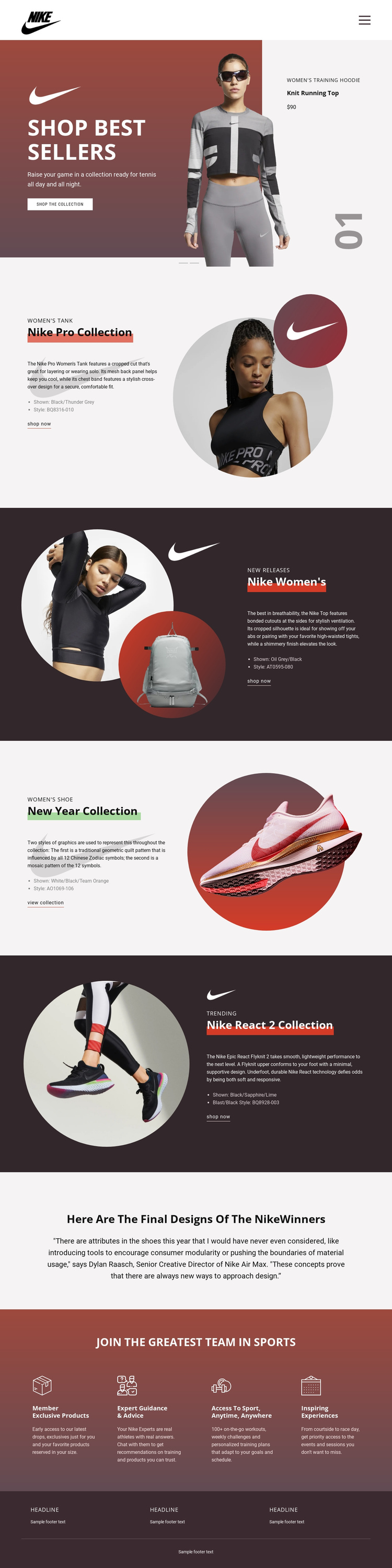
The page's sections create a natural continuous journey because each major block adds a different layer to the same sportswear presentation. The full-width Shop Best Sellers slider provides the opening destination, with two promotional slides that introduce product imagery, collection copy, price information, and a shopping action. From there, the visitor can move through four clearly separated collection destinations rather than encountering one uninterrupted wall of text or images.
Nike Pro Collection begins the detailed sequence with a women's tank feature and circular athlete imagery. Nike Women's follows with new releases in a dark split layout, then New Year Collection shifts the subject to a women's shoe and seasonal collection link. Nike React 2 Collection completes the product sequence with trending footwear and technology-focused copy. The repeated split structure gives these sections a common visual rhythm, while the changing backgrounds, labels, imagery, and actions make each one meaningful as its own point in the page journey.
The centered quotation provides a distinct editorial destination after the collection content. The following membership block offers four separate benefit areas: Member Exclusive Products, Expert Guidance & Advice, Access to Sport, Anytime, Anywhere, and Inspiring Experiences. The dark red footer then closes the document with three information columns and final text. Keeping these product, editorial, membership, and footer areas together lets the design function as a complete one-page experience without depending on separate URLs for every subject.
Customize with Nicepage
Open this ready-made template in the One Page Template Builder and customize it visually in the Nicepage editor. Replace demo content, edit page sections, and adapt the design to your project without rebuilding the template from scratch.
Build a Navigable One-Page Website
Connect the Menu to Page Sections
Organize the website as a sequence of sections on a single page and use the Menu For One-Page Site to connect menu items with individual page Blocks. Visitors can jump directly to sections such as About, Services, Testimonials, or Contact without opening separate pages.
Keep the Website on One URL
A one-page template can combine several parts of a small website within one continuous page. Arrange the Header, introduction, services, portfolio, company information, reviews, contact details, and other relevant sections in the order that fits the project while keeping them accessible through the same page navigation.
Make Long Pages Easier to Navigate
For longer one-page websites, keep navigation labels short and connected to meaningful sections so visitors can move through the page without relying only on scrolling. You can also use the Back To Top element to provide a quick way back to the beginning after longer sections.
This workflow makes the template suitable for compact websites that need several distinct content sections while keeping the complete visitor experience on one URL.