Reservation form Joomla Template


The Reservation Request Forms a Structured CMS Content Region
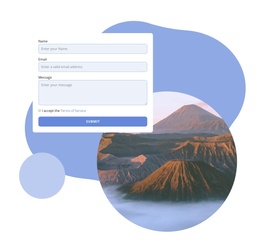
The centered heading and supporting statement give this section a defined informational purpose before the visitor reaches the form. “Make a reservation” identifies the request, while the text about therapist training and treatment standards supplies context that can remain associated with the reservation content. Beneath that introduction, the single-column form divides the request into name, email, and message inputs, followed by a Terms of Service checkbox and a centered Submit control.
In a Joomla-managed page, this arrangement can serve as one stable content region for reservation or inquiry information. Its structure is more specific than a generic text area: the explanatory content leads into a data-collection interaction, and the consent control belongs to that same request. The thick purple border keeps the region visually identifiable when it appears alongside other CMS-managed content, while the white background and repeated field outlines preserve a restrained reading path.
The section can therefore remain a recognizable visual and informational unit while the broader Joomla project handles other page content and editorial areas. The CMS context surrounds the block rather than changing its internal function. What visitors encounter here is still the same reservation sequence: understand the request, provide contact details and a message, accept the stated terms, and use Submit to continue.
Customize with Nicepage
Open this ready-made template in the Joomla Page Builder and customize it visually in the Nicepage editor. Replace demo content, edit page sections, and adapt the design to your project without rebuilding the template from scratch.
Edit Template Offline
2. Create a new page or select existing
3. Click Add new block, search for id 81878 and click enter
Edit Template Online
Create Awesome Websites


Free Nicepage Builder
Keywords
Work With This Template in Joomla
Customize and Install the Joomla Template
Start with this ready-made template instead of building the Joomla design from scratch. Customize its layout, content, typography, images, sections, and other design elements visually in the Nicepage application, then export and install the Joomla Template, Nicepage Extension, and supported content on your Joomla website.
Edit the Template Directly in Joomla
After installation, you can edit the Joomla Template directly in Joomla with the Nicepage Joomla Extension. Customize the Header, Footer, Colors, Fonts, typography, and Page Templates from the Joomla workflow while keeping the site design connected with your CMS content.
Edit Joomla Articles Visually
Use the Nicepage Joomla Extension to open and edit Joomla Articles visually from the Joomla Administrator. Change text, images, sections, layouts, and other page content in the Nicepage editor while continuing to manage the Articles through Joomla.
Joomla Content and Template Integration
Use the customized template together with Joomla Articles, module Positions, menus, forms, Blog Pages, and other supported CMS elements. With the Nicepage Extension used as the Site Style Source, shared design settings can be applied across Joomla Articles while Joomla continues to provide the CMS environment for managing site content.
This workflow combines a ready-made Joomla Template with visual customization, direct template editing in Joomla, and continued content management through the Nicepage Joomla Extension.