Modern Fire Department Joomla Template


Edit Template Offline
2. Create new page and search for id 6664207
Edit Template Online
Create Awesome Websites


Free Nicepage Builder
Keywords
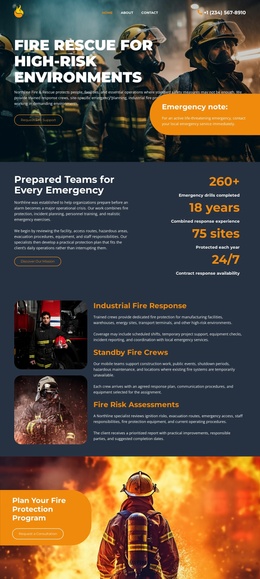
Service Groups and Operational Regions Form a Practical CMS Content Structure
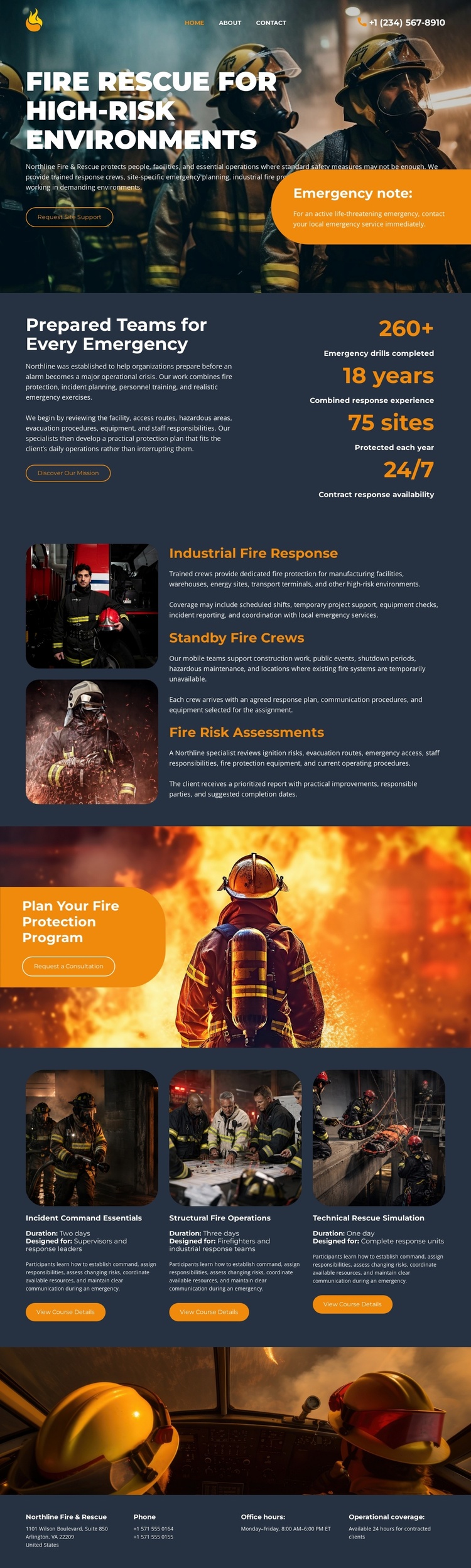
The three service rows give this design a natural division for structured fire-rescue information. Industrial fire response, standby fire crews, and fire risk assessments are presented as related but distinct offerings, each with its own image-and-text area. In a Joomla-managed project, that separation can help organize recurring service information while keeping the visual relationship between the items consistent. The page does not prove that Joomla Articles or module positions already exist; those are possible CMS interpretations rather than template facts.
The capability section provides a different content grouping. Industrial Command Essentials, Structural Fire Operations, and Tactical Rescue Simulation appear as three equal cards, making them suitable visual regions for training or operational capability descriptions that need to remain parallel. The upper metrics section adds a compact overview layer, while the hero and consultation panel establish the shared page context around those content areas.
Navigation and contact information also matter to a CMS-oriented implementation. The design includes navigation and closes with phone, office-hours, and operational-coverage labels, so recurring site regions can remain distinct from the service and capability content. This combination supports a Joomla project where structured informational areas, contact communication, and shared page framing work together without requiring the design to be treated as a generic CMS shell.
Customize with Nicepage
Open this ready-made template in the Joomla Page Builder and customize it visually in the Nicepage editor. Replace demo content, edit page sections, and adapt the design to your project without rebuilding the template from scratch.
Work With This Template in Joomla
Customize and Install the Joomla Template
Start with this ready-made template instead of building the Joomla design from scratch. Customize its layout, content, typography, images, sections, and other design elements visually in the Nicepage application, then export and install the Joomla Template, Nicepage Extension, and supported content on your Joomla website.
Edit the Template Directly in Joomla
After installation, you can edit the Joomla Template directly in Joomla with the Nicepage Joomla Extension. Customize the Header, Footer, Colors, Fonts, typography, and Page Templates from the Joomla workflow while keeping the site design connected with your CMS content.
Edit Joomla Articles Visually
Use the Nicepage Joomla Extension to open and edit Joomla Articles visually from the Joomla Administrator. Change text, images, sections, layouts, and other page content in the Nicepage editor while continuing to manage the Articles through Joomla.
Joomla Content and Template Integration
Use the customized template together with Joomla Articles, module Positions, menus, forms, Blog Pages, and other supported CMS elements. With the Nicepage Extension used as the Site Style Source, shared design settings can be applied across Joomla Articles while Joomla continues to provide the CMS environment for managing site content.
This workflow combines a ready-made Joomla Template with visual customization, direct template editing in Joomla, and continued content management through the Nicepage Joomla Extension.