Modern Poetry Author Joomla Template


Edit Template Offline
2. Create new page and search for id 6660403
Edit Template Online
Create Awesome Websites


Free Nicepage Builder
Keywords
Literary sections divide naturally into managed Joomla content areas
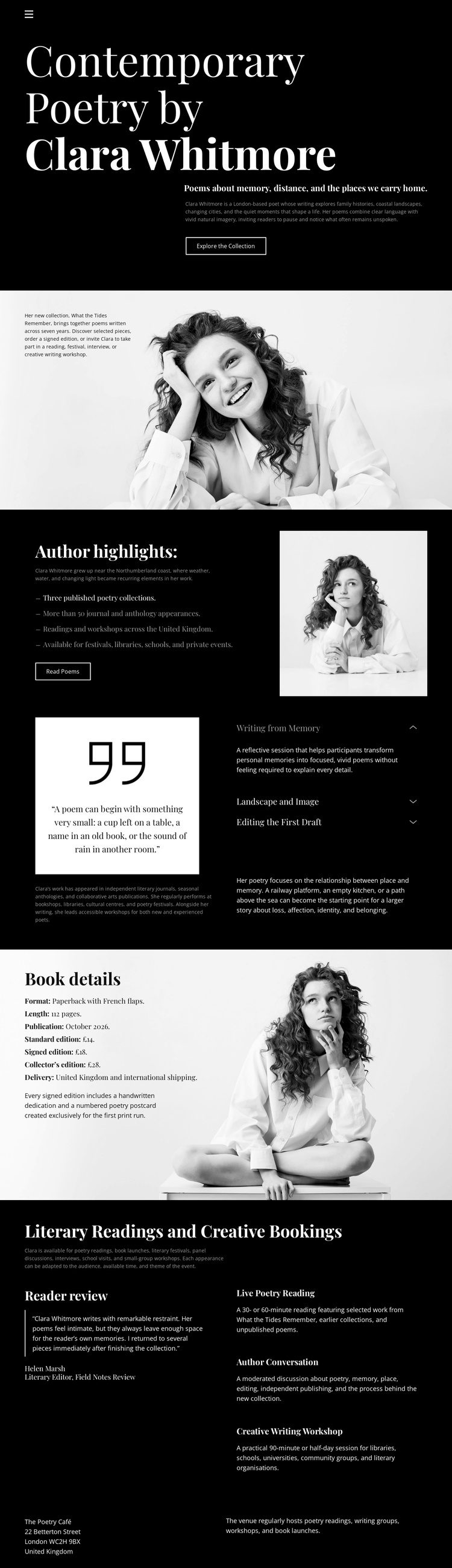
The design separates the author presentation into content regions that can remain coordinated while their wording and details are maintained through a CMS. The hero supplies the primary introduction to Clara Whitmore and the poetry collection, while the portrait-led section and Author highlights provide distinct areas for biographical and collection-focused information. This division helps a Joomla project treat the page as organized content rather than one uninterrupted text composition.
Book details forms another clearly defined region. Its collection description and metadata can be maintained separately from the reflective Working from Memory section, which presents a quotation and thematic labels about the author’s creative approach. The two sections serve different editorial purposes: one explains the publication, while the other frames the ideas behind the writing. Keeping those roles distinct supports a structured site where content can evolve without losing the visual relationship between sections.
The Literary Readings and Creative Bookings grid supplies a further content group with four offerings. Poetry Reading, Author Conversation, and Creative Writing Workshop can be treated as recurring informational areas alongside the broader literary readings category, while the footer preserves contact-oriented content and shared closing information. A Joomla implementation can therefore use the template’s existing navigation cues, repeated portrait treatment, service grouping, and contact region as a coherent CMS-managed structure. The value lies in mapping these actual areas to organized site content, not in adding an unrelated Joomla workflow to the page.
Customize with Nicepage
Open this ready-made template in the Joomla Page Builder and customize it visually in the Nicepage editor. Replace demo content, edit page sections, and adapt the design to your project without rebuilding the template from scratch.
Work With This Template in Joomla
Customize and Install the Joomla Template
Start with this ready-made template instead of building the Joomla design from scratch. Customize its layout, content, typography, images, sections, and other design elements visually in the Nicepage application, then export and install the Joomla Template, Nicepage Extension, and supported content on your Joomla website.
Edit the Template Directly in Joomla
After installation, you can edit the Joomla Template directly in Joomla with the Nicepage Joomla Extension. Customize the Header, Footer, Colors, Fonts, typography, and Page Templates from the Joomla workflow while keeping the site design connected with your CMS content.
Edit Joomla Articles Visually
Use the Nicepage Joomla Extension to open and edit Joomla Articles visually from the Joomla Administrator. Change text, images, sections, layouts, and other page content in the Nicepage editor while continuing to manage the Articles through Joomla.
Joomla Content and Template Integration
Use the customized template together with Joomla Articles, module Positions, menus, forms, Blog Pages, and other supported CMS elements. With the Nicepage Extension used as the Site Style Source, shared design settings can be applied across Joomla Articles while Joomla continues to provide the CMS environment for managing site content.
This workflow combines a ready-made Joomla Template with visual customization, direct template editing in Joomla, and continued content management through the Nicepage Joomla Extension.