
Personal Finance Bank Joomla Template


Edit Template Offline
2. Create new page and search for id 6657634
Edit Template Online
Create Awesome Websites


Free Nicepage Builder
Keywords
Banking Services, Plans, and Support Regions Suit Structured CMS Content
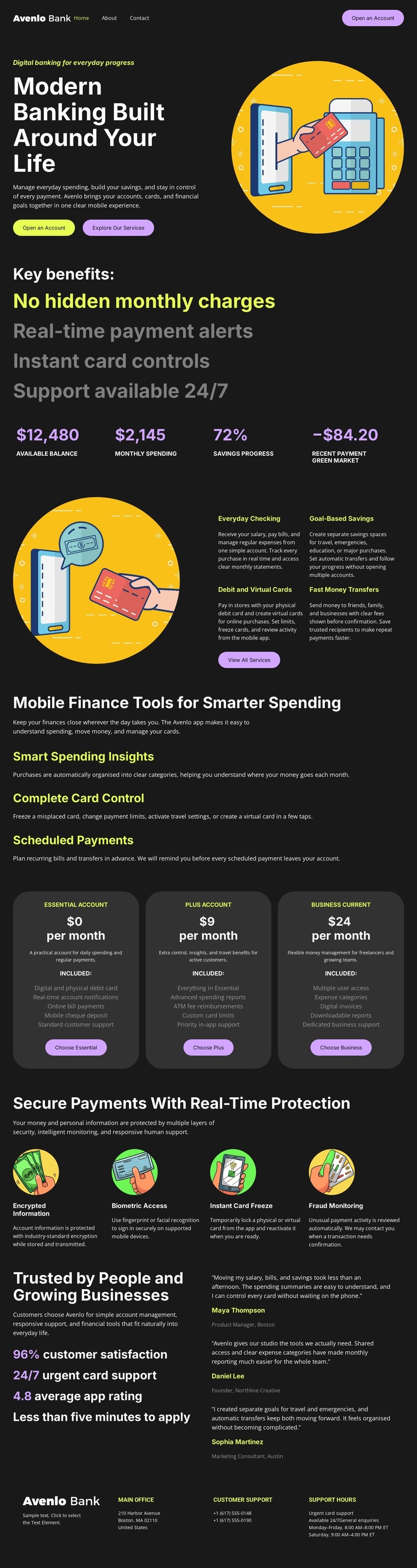
The service content is divided into recognizable regions: Everyday Checking, Global-Based Savings, Debit and Virtual Cards, Fast Money Transfers, and three mobile finance tools. This organization gives a Joomla project clear informational areas to maintain, while the navigation and multi-column footer provide shared places for moving between account, service, and support content.
The three account plans add a second kind of structured content. Each plan is displayed as its own rounded card with a label, monthly-price placeholder, description, and selection action. Because the cards are visually parallel, they can be treated as related plan information rather than unrelated promotional blocks. The security section uses a similar grouping principle with four protection labels covering encrypted information, biometric access, instant card freeze, and fraud monitoring.
The testimonial area introduces customer-oriented proof after the product and protection explanations, and the footer closes with support-related link groups. Together, these regions create a coherent CMS content arrangement without requiring unsupported assumptions about specific Joomla Articles or modules. The template supplies the visual framework; Joomla can provide the environment in which the banking information, navigation, recurring service descriptions, and support content are organized and maintained.
Customize with Nicepage
Open this ready-made template in the Joomla Page Builder and customize it visually in the Nicepage editor. Replace demo content, edit page sections, and adapt the design to your project without rebuilding the template from scratch.
Work With This Template in Joomla
Customize and Install the Joomla Template
Start with this ready-made template instead of building the Joomla design from scratch. Customize its layout, content, typography, images, sections, and other design elements visually in the Nicepage application, then export and install the Joomla Template, Nicepage Extension, and supported content on your Joomla website.
Edit the Template Directly in Joomla
After installation, you can edit the Joomla Template directly in Joomla with the Nicepage Joomla Extension. Customize the Header, Footer, Colors, Fonts, typography, and Page Templates from the Joomla workflow while keeping the site design connected with your CMS content.
Edit Joomla Articles Visually
Use the Nicepage Joomla Extension to open and edit Joomla Articles visually from the Joomla Administrator. Change text, images, sections, layouts, and other page content in the Nicepage editor while continuing to manage the Articles through Joomla.
Joomla Content and Template Integration
Use the customized template together with Joomla Articles, module Positions, menus, forms, Blog Pages, and other supported CMS elements. With the Nicepage Extension used as the Site Style Source, shared design settings can be applied across Joomla Articles while Joomla continues to provide the CMS environment for managing site content.
This workflow combines a ready-made Joomla Template with visual customization, direct template editing in Joomla, and continued content management through the Nicepage Joomla Extension.





















