New idea for a store Joomla Template


The Portrait and Paragraph Create a Structured Editorial Region
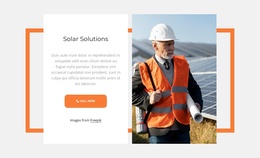
The block separates its editorial message into a recognizable Joomla-managed content region: a portrait-led visual area on the left and a written information area on the right. The heading, “New horizons for magazine content,” identifies the subject, and the single extended paragraph develops the relationship between magazine publishing and print, online, and mobile channels. This arrangement suits content that needs sustained reading rather than a sequence of short labels or interactive panels.
The internal structure is simple enough to remain a stable section while surrounding Joomla-managed content changes elsewhere in the site. The portrait supplies context and visual emphasis, while the vertically centered heading and paragraph give the text a consistent place within the split. The light neutral background supports the text and image together; bold black type establishes the entry point, and smaller light-gray copy keeps the long-form passage visually subordinate to the heading. A pale gray vertical rectangle behind the right side adds a quiet boundary to the editorial region.
In a Joomla-oriented project, this block can participate in a page that organizes articles or other editorial areas without becoming a complete Joomla Template. Its practical role is a reusable presentation for one magazine-content feature, with the surrounding CMS-managed page supplying additional sections, navigation, and related material.
Customize with Nicepage
Open this ready-made template in the Joomla Page Builder and customize it visually in the Nicepage editor. Replace demo content, edit page sections, and adapt the design to your project without rebuilding the template from scratch.
Edit Template Offline
2. Create a new page or select existing
3. Click Add new block, search for id 655915 and click enter
Edit Template Online
Create Awesome Websites


Free Nicepage Builder
Keywords
Work With This Template in Joomla
Customize and Install the Joomla Template
Start with this ready-made template instead of building the Joomla design from scratch. Customize its layout, content, typography, images, sections, and other design elements visually in the Nicepage application, then export and install the Joomla Template, Nicepage Extension, and supported content on your Joomla website.
Edit the Template Directly in Joomla
After installation, you can edit the Joomla Template directly in Joomla with the Nicepage Joomla Extension. Customize the Header, Footer, Colors, Fonts, typography, and Page Templates from the Joomla workflow while keeping the site design connected with your CMS content.
Edit Joomla Articles Visually
Use the Nicepage Joomla Extension to open and edit Joomla Articles visually from the Joomla Administrator. Change text, images, sections, layouts, and other page content in the Nicepage editor while continuing to manage the Articles through Joomla.
Joomla Content and Template Integration
Use the customized template together with Joomla Articles, module Positions, menus, forms, Blog Pages, and other supported CMS elements. With the Nicepage Extension used as the Site Style Source, shared design settings can be applied across Joomla Articles while Joomla continues to provide the CMS environment for managing site content.
This workflow combines a ready-made Joomla Template with visual customization, direct template editing in Joomla, and continued content management through the Nicepage Joomla Extension.