Class poll Joomla Template


A Structured Classroom Poll Region for Joomla Content
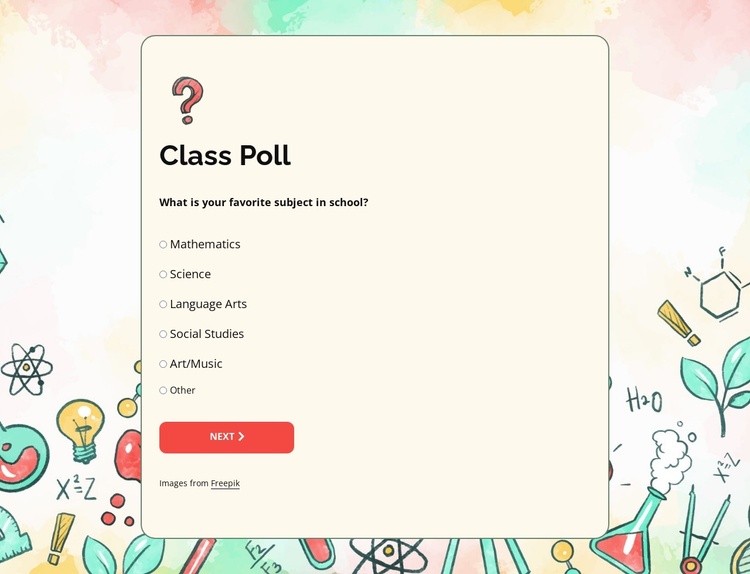
The Class Poll card separates a focused question from a defined set of response choices. “What is your favorite subject in school?” introduces six informational options—Mathematics, Science, Language Arts, Social Studies, Art/Music, and Other—so the section can be understood as a compact structured content region rather than a general text panel. The red NEXT button closes the visible response sequence and gives the poll a recognizable action area.
In a Joomla-managed page, this block can occupy a stable content region for classroom information, learning activities, or a survey-style prompt while the surrounding project handles broader editorial organization. Its centered card keeps the question and choices together, and the warm off-white surface, rounded corners, and thin dark outline make that region distinct from the pale watercolor background. The colorful educational doodles add context around the content without changing the poll's internal order.
The block's six-option model is especially useful when structured information needs to remain easy to review at a glance. The visible labels can be adapted to the surrounding Joomla content plan while preserving the relationship between heading, question, choice list, and next-step control. Because the interaction shown here is static, the section describes the poll visually; any stored response, article workflow, or additional CMS behavior would belong to the broader Joomla project rather than this individual block.
Customize with Nicepage
Open this ready-made template in the Joomla Page Builder and customize it visually in the Nicepage editor. Replace demo content, edit page sections, and adapt the design to your project without rebuilding the template from scratch.
Edit Template Offline
2. Create a new page or select existing
3. Click Add new block, search for id 6537746 and click enter
Edit Template Online
Create Awesome Websites


Free Nicepage Builder
Keywords
Work With This Template in Joomla
Customize and Install the Joomla Template
Start with this ready-made template instead of building the Joomla design from scratch. Customize its layout, content, typography, images, sections, and other design elements visually in the Nicepage application, then export and install the Joomla Template, Nicepage Extension, and supported content on your Joomla website.
Edit the Template Directly in Joomla
After installation, you can edit the Joomla Template directly in Joomla with the Nicepage Joomla Extension. Customize the Header, Footer, Colors, Fonts, typography, and Page Templates from the Joomla workflow while keeping the site design connected with your CMS content.
Edit Joomla Articles Visually
Use the Nicepage Joomla Extension to open and edit Joomla Articles visually from the Joomla Administrator. Change text, images, sections, layouts, and other page content in the Nicepage editor while continuing to manage the Articles through Joomla.
Joomla Content and Template Integration
Use the customized template together with Joomla Articles, module Positions, menus, forms, Blog Pages, and other supported CMS elements. With the Nicepage Extension used as the Site Style Source, shared design settings can be applied across Joomla Articles while Joomla continues to provide the CMS environment for managing site content.
This workflow combines a ready-made Joomla Template with visual customization, direct template editing in Joomla, and continued content management through the Nicepage Joomla Extension.