Team lunch poll Joomla Template


Structured Meal Preferences in a Joomla Content Region
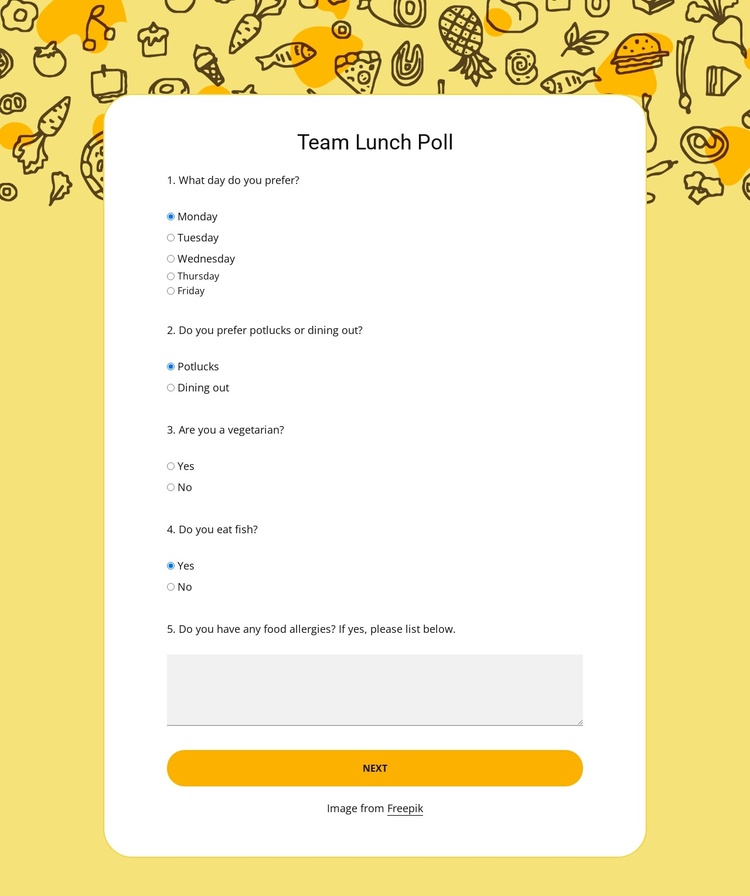
The four radio groups turn the block into a compact structured-information area for a team meal poll. Respondents can choose a weekday from Monday through Friday, select between Potlucks and Dining out, and answer the vegetarian and fish questions. The food-allergy textarea then provides a separate place for dietary details that do not fit a simple choice. Together, these fields create a focused content region rather than a general contact area.
A second carousel step extends the same region with name and email fields and an event-ideas textarea. That arrangement gives the poll a practical editorial sequence: preference data first, participant details and organization suggestions next. The centered white card, single-column spacing, and strong contrast keep each information unit readable, while the illustrated food background identifies the section’s subject without adding extra content claims. In a Joomla-managed project, this block can participate as one reusable page section for structured team-event information while the broader site handles its other articles, pages, and content areas. The section’s CMS context changes how it may be maintained around the site; it does not change the verified fields, two-step flow, or visual organization inside the block.
Customize with Nicepage
Open this ready-made template in the Joomla Page Builder and customize it visually in the Nicepage editor. Replace demo content, edit page sections, and adapt the design to your project without rebuilding the template from scratch.
Edit Template Offline
2. Create a new page or select existing
3. Click Add new block, search for id 6536442 and click enter
Edit Template Online
Create Awesome Websites


Free Nicepage Builder
Keywords
Work With This Template in Joomla
Customize and Install the Joomla Template
Start with this ready-made template instead of building the Joomla design from scratch. Customize its layout, content, typography, images, sections, and other design elements visually in the Nicepage application, then export and install the Joomla Template, Nicepage Extension, and supported content on your Joomla website.
Edit the Template Directly in Joomla
After installation, you can edit the Joomla Template directly in Joomla with the Nicepage Joomla Extension. Customize the Header, Footer, Colors, Fonts, typography, and Page Templates from the Joomla workflow while keeping the site design connected with your CMS content.
Edit Joomla Articles Visually
Use the Nicepage Joomla Extension to open and edit Joomla Articles visually from the Joomla Administrator. Change text, images, sections, layouts, and other page content in the Nicepage editor while continuing to manage the Articles through Joomla.
Joomla Content and Template Integration
Use the customized template together with Joomla Articles, module Positions, menus, forms, Blog Pages, and other supported CMS elements. With the Nicepage Extension used as the Site Style Source, shared design settings can be applied across Joomla Articles while Joomla continues to provide the CMS environment for managing site content.
This workflow combines a ready-made Joomla Template with visual customization, direct template editing in Joomla, and continued content management through the Nicepage Joomla Extension.