Aesthetic Architectural Excellence Joomla Template


Edit Template Offline
2. Create new page and search for id 6488280
Edit Template Online
Create Awesome Websites


Free Nicepage Builder
Keywords
Office Directory and Inquiry Content in a Structured Joomla Layout
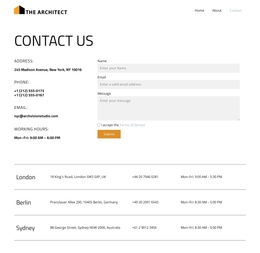
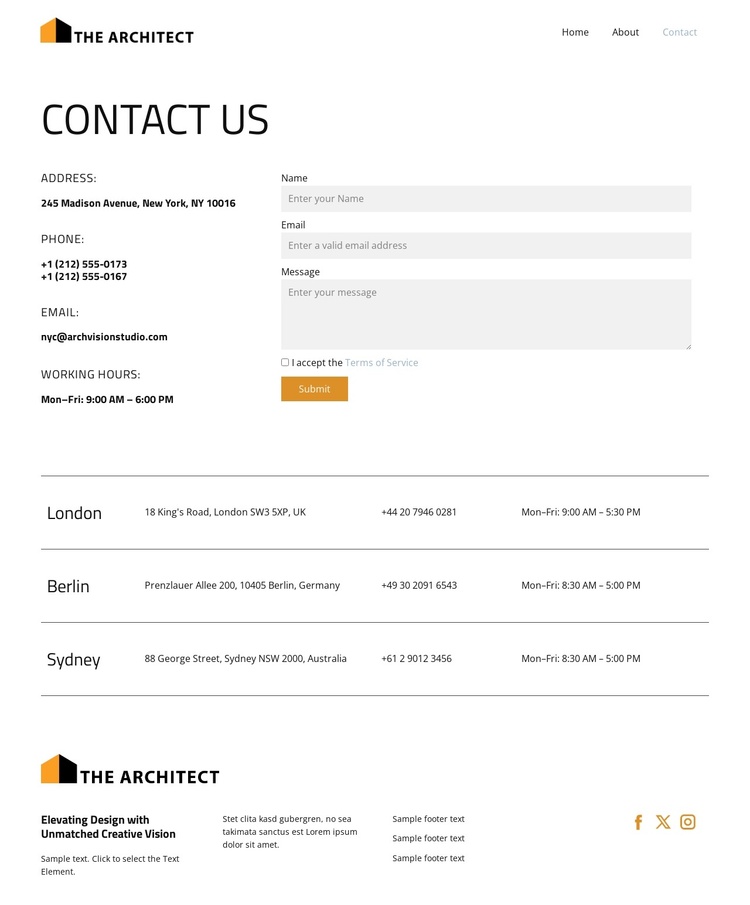
The contact section divides two related responsibilities without separating them visually: office information appears on the left, while the inquiry form occupies the right side. That arrangement gives the page a clear content region for contact details and another for visitor messages, including name, email, and message fields. The Terms of Service option and Submit action complete the interaction without turning the page into a dense application screen.
The office directory extends the page beyond a single location. London, Berlin, and Sydney are presented as repeated rows with city, address, phone, and working-hours information, creating a consistent structure for location-based content. In a Joomla-managed project, these areas can be treated as organized site content while preserving the same visual relationship between the inquiry area and the directory. The shared navigation also gives Home, About, and Contact clear roles within the site structure, rather than leaving the contact page as an isolated endpoint.
The footer adds another reusable region through its brand mark, text columns, and three social links. Together, the header, contact block, directory, and footer provide a coherent arrangement for a CMS-oriented contact page: primary navigation at the top, visitor-facing contact content in the center, repeatable office information below, and supporting brand links at the close. The restrained typography and spacing help these structured regions remain easy to scan.
Customize with Nicepage
Open this ready-made template in the Joomla Page Builder and customize it visually in the Nicepage editor. Replace demo content, edit page sections, and adapt the design to your project without rebuilding the template from scratch.
Work With This Template in Joomla
Customize and Install the Joomla Template
Start with this ready-made template instead of building the Joomla design from scratch. Customize its layout, content, typography, images, sections, and other design elements visually in the Nicepage application, then export and install the Joomla Template, Nicepage Extension, and supported content on your Joomla website.
Edit the Template Directly in Joomla
After installation, you can edit the Joomla Template directly in Joomla with the Nicepage Joomla Extension. Customize the Header, Footer, Colors, Fonts, typography, and Page Templates from the Joomla workflow while keeping the site design connected with your CMS content.
Edit Joomla Articles Visually
Use the Nicepage Joomla Extension to open and edit Joomla Articles visually from the Joomla Administrator. Change text, images, sections, layouts, and other page content in the Nicepage editor while continuing to manage the Articles through Joomla.
Joomla Content and Template Integration
Use the customized template together with Joomla Articles, module Positions, menus, forms, Blog Pages, and other supported CMS elements. With the Nicepage Extension used as the Site Style Source, shared design settings can be applied across Joomla Articles while Joomla continues to provide the CMS environment for managing site content.
This workflow combines a ready-made Joomla Template with visual customization, direct template editing in Joomla, and continued content management through the Nicepage Joomla Extension.