Our products and services Joomla Template


Service Categories Create a Structured Joomla Content Region
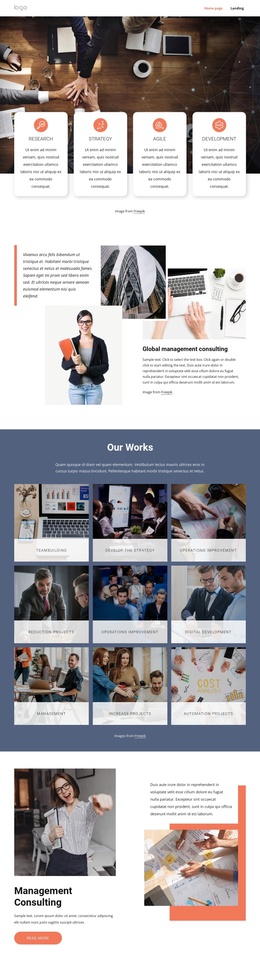
The “Products & Services” heading gives the section a clear editorial entry point, while the six repeated cards divide the information into recognizable service categories. Technology, Development, Trainings, Learning, Our people, and Leadership each occupy the same image-backed pattern, with a supporting description line and bottom divider reinforcing the boundary of every item. The dark overlay keeps the white labels and descriptions legible against the imagery.
In a Joomla-oriented page composition, this organization can serve as a stable structured information region for business and professional services. The six cards are visually distinct enough to separate categories, yet consistent enough to read as one coordinated group. Their two-row, three-column arrangement supports a straightforward overview: visitors can scan the category names first and then use the accompanying lines for additional context. The sample wording can be replaced with the project’s own descriptions while the category-based structure remains intact.
Rounded corners, even spacing, and the white space surrounding the grid help the region sit cleanly between other CMS-managed content areas. The block therefore gives a Joomla page a reusable visual treatment for service information, while related pages or sections can handle deeper explanations, articles, contact details, or other editorial material.
Customize with Nicepage
Open this ready-made template in the Joomla Page Builder and customize it visually in the Nicepage editor. Replace demo content, edit page sections, and adapt the design to your project without rebuilding the template from scratch.
Edit Template Offline
2. Create a new page or select existing
3. Click Add new block, search for id 5510245 and click enter
Edit Template Online
Create Awesome Websites


Free Nicepage Builder
Keywords
Work With This Template in Joomla
Customize and Install the Joomla Template
Start with this ready-made template instead of building the Joomla design from scratch. Customize its layout, content, typography, images, sections, and other design elements visually in the Nicepage application, then export and install the Joomla Template, Nicepage Extension, and supported content on your Joomla website.
Edit the Template Directly in Joomla
After installation, you can edit the Joomla Template directly in Joomla with the Nicepage Joomla Extension. Customize the Header, Footer, Colors, Fonts, typography, and Page Templates from the Joomla workflow while keeping the site design connected with your CMS content.
Edit Joomla Articles Visually
Use the Nicepage Joomla Extension to open and edit Joomla Articles visually from the Joomla Administrator. Change text, images, sections, layouts, and other page content in the Nicepage editor while continuing to manage the Articles through Joomla.
Joomla Content and Template Integration
Use the customized template together with Joomla Articles, module Positions, menus, forms, Blog Pages, and other supported CMS elements. With the Nicepage Extension used as the Site Style Source, shared design settings can be applied across Joomla Articles while Joomla continues to provide the CMS environment for managing site content.
This workflow combines a ready-made Joomla Template with visual customization, direct template editing in Joomla, and continued content management through the Nicepage Joomla Extension.