We provide the analytic approach Joomla Template


Edit Template Offline
2. Create new page and search for id 4586623
Edit Template Online
Create Awesome Websites


Free Nicepage Builder
Keywords
Company Services and Beliefs Form Structured Joomla Content Areas
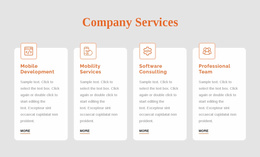
The Company Services section divides the consulting offer into recognizable content areas: Development, Mobility Services, IT Consulting, and Our Team. That grouping gives a Joomla project a practical editorial structure for presenting related information without losing the page’s visual order. The preceding identity cards add another layer, separating Who We Are, Our Values, and Our People so organizational information does not compete directly with service descriptions.
The design also includes reusable-looking navigation, social links, contact details, and a form-based closing section. Together, these regions create clear places for menu-led content, service information, company statements, and inquiries within a CMS-managed site. The dark sections provide a consistent frame for the white service cards, while orange headings and accents connect separate content groups visually. This relationship is useful when adapting the layout for Joomla because structured information can continue to occupy distinct regions instead of becoming one undifferentiated page of text.
The overlapping belief sections provide additional editorial space for explaining the organization’s approach through an image, heading, and supporting copy. The testimonial panel can similarly carry a client perspective as supporting content, while the contact area brings the page back to a practical response point. The result is a design whose content regions can be organized around consulting information, navigation, and contact communication while retaining a coordinated presentation.
Customize with Nicepage
Open this ready-made template in the Joomla Page Builder and customize it visually in the Nicepage editor. Replace demo content, edit page sections, and adapt the design to your project without rebuilding the template from scratch.
Work With This Template in Joomla
Customize and Install the Joomla Template
Start with this ready-made template instead of building the Joomla design from scratch. Customize its layout, content, typography, images, sections, and other design elements visually in the Nicepage application, then export and install the Joomla Template, Nicepage Extension, and supported content on your Joomla website.
Edit the Template Directly in Joomla
After installation, you can edit the Joomla Template directly in Joomla with the Nicepage Joomla Extension. Customize the Header, Footer, Colors, Fonts, typography, and Page Templates from the Joomla workflow while keeping the site design connected with your CMS content.
Edit Joomla Articles Visually
Use the Nicepage Joomla Extension to open and edit Joomla Articles visually from the Joomla Administrator. Change text, images, sections, layouts, and other page content in the Nicepage editor while continuing to manage the Articles through Joomla.
Joomla Content and Template Integration
Use the customized template together with Joomla Articles, module Positions, menus, forms, Blog Pages, and other supported CMS elements. With the Nicepage Extension used as the Site Style Source, shared design settings can be applied across Joomla Articles while Joomla continues to provide the CMS environment for managing site content.
This workflow combines a ready-made Joomla Template with visual customization, direct template editing in Joomla, and continued content management through the Nicepage Joomla Extension.