Hyper-realistic drawings Joomla Template


Edit Template Offline
2. Create new page and search for id 24662
Edit Template Online
Create Awesome Websites


Free Nicepage Builder
Keywords
Portrait Series and Exhibition Regions Form a Structured Artist Site
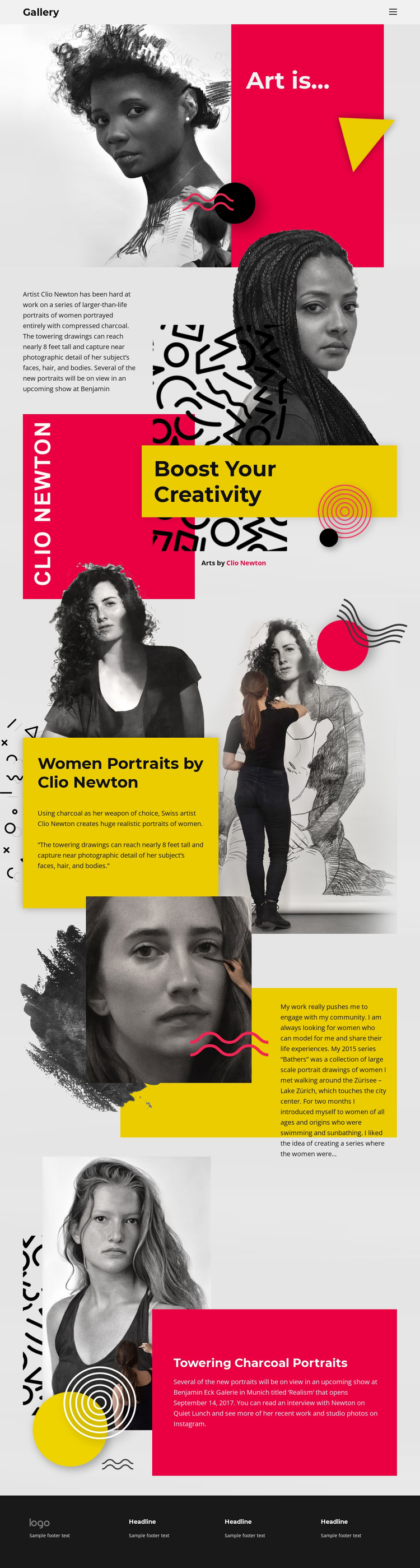
The page separates the artist’s information into recognizable content regions that can be interpreted naturally within a CMS-managed Joomla site. The Gallery header provides the main navigation frame, while the “Art is...” opening establishes the visual identity before the following section introduces Clio Newton and her practice. The Women Portraits block then gives the central subject a more specific informational area by explaining realistic portraits of women made with compressed charcoal.
The Bathers section offers a different kind of structured content. Its portrait imagery is paired with a narrative about meeting women around Lake Zürich and a series identified as dating from 2015, so it can be treated as a distinct research or project area rather than another generic gallery panel. The final artwork section shifts toward exhibition context, connecting towering drawings and recent work with Benjamin Eck Galerie in Munich. Together, these regions create a practical separation between artist identity, series information, project narrative, and exhibition material.
The dark footer reinforces the shared site-region logic by grouping repeated informational content below the artwork sections. In a Joomla project, this arrangement can support a visually coordinated site in which navigation and recurring information remain stable while the artist’s structured content is maintained through the CMS. The interpretation depends on the page’s actual divisions, not on assuming that Joomla-specific articles or modules already exist.
Customize with Nicepage
Open this ready-made template in the Joomla Page Builder and customize it visually in the Nicepage editor. Replace demo content, edit page sections, and adapt the design to your project without rebuilding the template from scratch.
Work With This Template in Joomla
Customize and Install the Joomla Template
Start with this ready-made template instead of building the Joomla design from scratch. Customize its layout, content, typography, images, sections, and other design elements visually in the Nicepage application, then export and install the Joomla Template, Nicepage Extension, and supported content on your Joomla website.
Edit the Template Directly in Joomla
After installation, you can edit the Joomla Template directly in Joomla with the Nicepage Joomla Extension. Customize the Header, Footer, Colors, Fonts, typography, and Page Templates from the Joomla workflow while keeping the site design connected with your CMS content.
Edit Joomla Articles Visually
Use the Nicepage Joomla Extension to open and edit Joomla Articles visually from the Joomla Administrator. Change text, images, sections, layouts, and other page content in the Nicepage editor while continuing to manage the Articles through Joomla.
Joomla Content and Template Integration
Use the customized template together with Joomla Articles, module Positions, menus, forms, Blog Pages, and other supported CMS elements. With the Nicepage Extension used as the Site Style Source, shared design settings can be applied across Joomla Articles while Joomla continues to provide the CMS environment for managing site content.
This workflow combines a ready-made Joomla Template with visual customization, direct template editing in Joomla, and continued content management through the Nicepage Joomla Extension.