Management consultancy Joomla Template


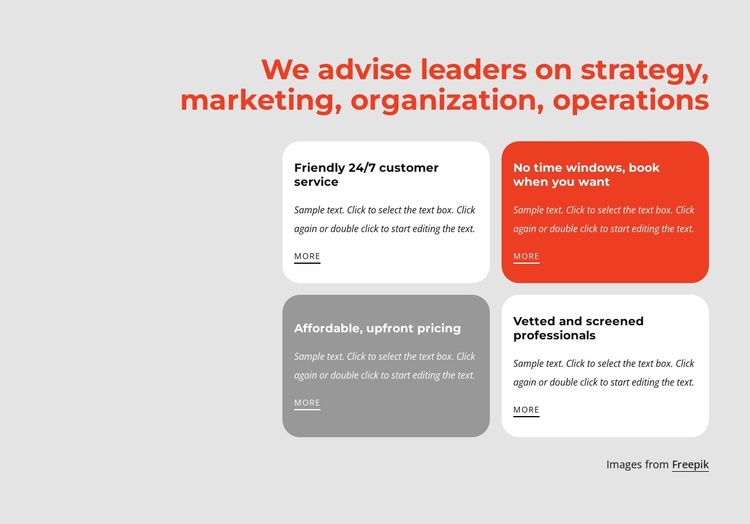
The two-by-two card grid creates a structured advisory content area
The heading “We advise leaders on strategy, marketing, organization, operations” establishes the subject of the section, while the four cards divide that subject into separate informational units. Their two-by-two arrangement suits a Joomla-managed page because the content can be understood as a stable advisory-services region rather than a single undifferentiated paragraph. Each card contains a title, supporting paragraph, and “more” link, giving the section a repeated pattern for presenting related service information.
The supplied card titles refer to customer service, booking flexibility, upfront pricing, and screened professionals. In a Joomla-oriented project, those themes can guide structured page content while the wider site manages its broader editorial and navigation context. The sample paragraphs should be replaced with final wording, but their presence confirms that every card is designed to carry both a short label and explanatory text. The visible Freepik credit forms a separate attribution line below the cards and should remain distinct from the advisory descriptions. A broader Joomla Articles workflow can provide the surrounding CMS context without changing the block’s section role.
Color also helps organize the content: white, red, and gray cards alternate across a light gray background, with rounded corners and generous internal spacing reinforcing the boundaries between items. The section can therefore function as a reusable Joomla content area for advisory information, while other blocks handle surrounding page roles.
Customize with Nicepage
Open this ready-made template in the Joomla Page Builder and customize it visually in the Nicepage editor. Replace demo content, edit page sections, and adapt the design to your project without rebuilding the template from scratch.
Edit Template Offline
2. Create a new page or select existing
3. Click Add new block, search for id 2334371 and click enter
Edit Template Online
Create Awesome Websites


Free Nicepage Builder
Keywords
Work With This Template in Joomla
Customize and Install the Joomla Template
Start with this ready-made template instead of building the Joomla design from scratch. Customize its layout, content, typography, images, sections, and other design elements visually in the Nicepage application, then export and install the Joomla Template, Nicepage Extension, and supported content on your Joomla website.
Edit the Template Directly in Joomla
After installation, you can edit the Joomla Template directly in Joomla with the Nicepage Joomla Extension. Customize the Header, Footer, Colors, Fonts, typography, and Page Templates from the Joomla workflow while keeping the site design connected with your CMS content.
Edit Joomla Articles Visually
Use the Nicepage Joomla Extension to open and edit Joomla Articles visually from the Joomla Administrator. Change text, images, sections, layouts, and other page content in the Nicepage editor while continuing to manage the Articles through Joomla.
Joomla Content and Template Integration
Use the customized template together with Joomla Articles, module Positions, menus, forms, Blog Pages, and other supported CMS elements. With the Nicepage Extension used as the Site Style Source, shared design settings can be applied across Joomla Articles while Joomla continues to provide the CMS environment for managing site content.
This workflow combines a ready-made Joomla Template with visual customization, direct template editing in Joomla, and continued content management through the Nicepage Joomla Extension.