Super seople Joomla Template


Structured Workplace Information for a Joomla Page
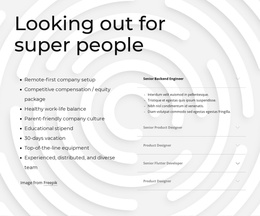
The upper white panel organizes the workplace proposition as stable informational content. The heading “Looking out for super people” introduces eight benefits, including a remote-first setup, compensation and equity, parent-friendly culture, vacation, equipment, and a distributed team. Because the list is compact and centered over the cosmic purple-blue image band, it can function as a recognizable information region without competing with the role content below.
The blue lower panel supplies a second structured region based on four expandable role entries. Senior Backend Engineer is open and displays four bullet points, while Senior Product Designer and the two Product Designer entries remain closed. This arrangement gives each role a clear label and reserves additional space for its details when a visitor selects it. It also keeps the benefits and available positions connected while preserving their different content behaviors.
In a Joomla-oriented page composition, the block can serve as a reusable careers or workplace-content area alongside other managed information. Its value comes from the specific relationship between a stable benefits list and a role accordion, not from assuming particular CMS records inside the section. The broader Joomla project can organize surrounding editorial content while this visual region maintains its centered hierarchy and blue-and-white contrast.
Customize with Nicepage
Open this ready-made template in the Joomla Page Builder and customize it visually in the Nicepage editor. Replace demo content, edit page sections, and adapt the design to your project without rebuilding the template from scratch.
Edit Template Offline
2. Create a new page or select existing
3. Click Add new block, search for id 2122684 and click enter
Edit Template Online
Create Awesome Websites


Free Nicepage Builder
Keywords
Work With This Template in Joomla
Customize and Install the Joomla Template
Start with this ready-made template instead of building the Joomla design from scratch. Customize its layout, content, typography, images, sections, and other design elements visually in the Nicepage application, then export and install the Joomla Template, Nicepage Extension, and supported content on your Joomla website.
Edit the Template Directly in Joomla
After installation, you can edit the Joomla Template directly in Joomla with the Nicepage Joomla Extension. Customize the Header, Footer, Colors, Fonts, typography, and Page Templates from the Joomla workflow while keeping the site design connected with your CMS content.
Edit Joomla Articles Visually
Use the Nicepage Joomla Extension to open and edit Joomla Articles visually from the Joomla Administrator. Change text, images, sections, layouts, and other page content in the Nicepage editor while continuing to manage the Articles through Joomla.
Joomla Content and Template Integration
Use the customized template together with Joomla Articles, module Positions, menus, forms, Blog Pages, and other supported CMS elements. With the Nicepage Extension used as the Site Style Source, shared design settings can be applied across Joomla Articles while Joomla continues to provide the CMS environment for managing site content.
This workflow combines a ready-made Joomla Template with visual customization, direct template editing in Joomla, and continued content management through the Nicepage Joomla Extension.