Quickly growing company Joomla Template


Benefits and Role Details Form a Structured Recruitment Region
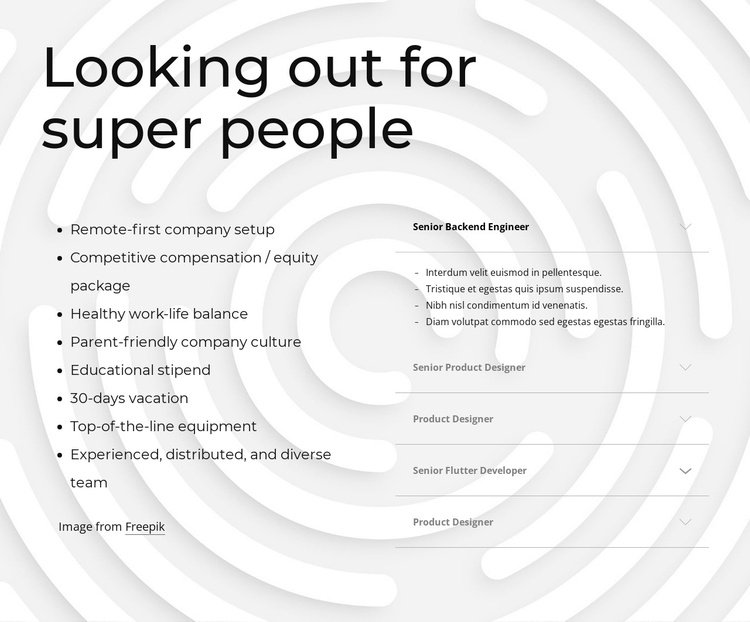
The eight-item benefits list gives the section a stable informational core, while the five job-opening items organize employment opportunities into a separate content region. In a Joomla-managed site, this makes the block suitable for a recruitment or workplace-culture area where visitors can compare the organization’s benefits with the roles currently presented in the section. The heading “Looking out for super people” connects both sides without requiring the block to carry the rest of the company’s content.
The accordion gives the role column a different content rhythm from the benefits column. Visitors can keep the job titles compact and open a relevant item for more information. The expanded Senior Backend Engineer entry demonstrates the pattern with four detail bullets. Senior Product Designer, Product Designer, and Senior Flutter Developer are also visible role labels, creating a recognizable set of structured employment topics rather than one undifferentiated text panel.
The visual treatment supports this content model. A large black heading leads into balanced left-aligned columns, restrained gray typography keeps supporting information quiet, and thin dividers distinguish the accordion items. In a Joomla project, the section can remain a reusable content region while surrounding site areas handle navigation, company background, application instructions, and other editorial material. The block therefore contributes organized recruitment content without becoming a complete Joomla template or site.
Customize with Nicepage
Open this ready-made template in the Joomla Page Builder and customize it visually in the Nicepage editor. Replace demo content, edit page sections, and adapt the design to your project without rebuilding the template from scratch.
Edit Template Offline
2. Create a new page or select existing
3. Click Add new block, search for id 1053802 and click enter
Edit Template Online
Create Awesome Websites


Free Nicepage Builder
Keywords
Work With This Template in Joomla
Customize and Install the Joomla Template
Start with this ready-made template instead of building the Joomla design from scratch. Customize its layout, content, typography, images, sections, and other design elements visually in the Nicepage application, then export and install the Joomla Template, Nicepage Extension, and supported content on your Joomla website.
Edit the Template Directly in Joomla
After installation, you can edit the Joomla Template directly in Joomla with the Nicepage Joomla Extension. Customize the Header, Footer, Colors, Fonts, typography, and Page Templates from the Joomla workflow while keeping the site design connected with your CMS content.
Edit Joomla Articles Visually
Use the Nicepage Joomla Extension to open and edit Joomla Articles visually from the Joomla Administrator. Change text, images, sections, layouts, and other page content in the Nicepage editor while continuing to manage the Articles through Joomla.
Joomla Content and Template Integration
Use the customized template together with Joomla Articles, module Positions, menus, forms, Blog Pages, and other supported CMS elements. With the Nicepage Extension used as the Site Style Source, shared design settings can be applied across Joomla Articles while Joomla continues to provide the CMS environment for managing site content.
This workflow combines a ready-made Joomla Template with visual customization, direct template editing in Joomla, and continued content management through the Nicepage Joomla Extension.