
Mobile App Development Joomla Template


Edit Template Offline
2. Create new page and search for id 18718
Edit Template Online
Create Awesome Websites


Free Nicepage Builder
Keywords
Agency sections and repeated content areas suit a managed Joomla structure
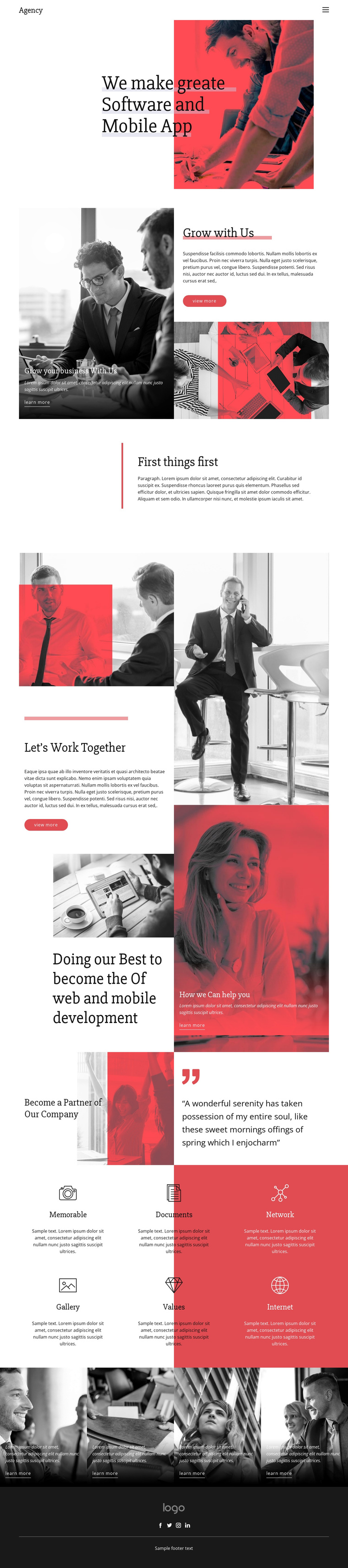
The compact Agency header establishes a shared navigation region before the page moves into content areas with different editorial roles. The hero introduces software and mobile app development, while Grow with Us presents business-growth messaging with an image, explanatory copy, and action links. These areas can be treated as structured site content rather than as one uninterrupted graphic composition, giving a Joomla project recognizable regions for maintaining the agency presentation.
The Let’s Work Together collage adds several related content zones: multiple photographs, collaboration language, service-oriented messaging, a view more button, and a learn more link. The partnership section provides another distinct region, pairing an image-backed invitation with a prominent testimonial-style quote. Because the quote is unattributed sample content, it should be replaced or verified before publication; structurally, it still demonstrates how partnership or proof-oriented material can sit within the page.
The six repeated feature items offer a consistent format for labeled information, while the four image tiles create a separate promotional gallery with recurring learn more actions. The footer consolidates the brand mark, divider, footer text, and Facebook, Twitter, Instagram, and LinkedIn links into a reusable closing region. For a Joomla implementation, this separation between navigation, service information, repeated items, promotional content, and footer content is more useful than simply applying a CMS label. Nicepage’s Joomla Extension can provide a product bridge when the project needs Joomla-managed page content.
Customize with Nicepage
Open this ready-made template in the Joomla Page Builder and customize it visually in the Nicepage editor. Replace demo content, edit page sections, and adapt the design to your project without rebuilding the template from scratch.
Work With This Template in Joomla
Customize and Install the Joomla Template
Start with this ready-made template instead of building the Joomla design from scratch. Customize its layout, content, typography, images, sections, and other design elements visually in the Nicepage application, then export and install the Joomla Template, Nicepage Extension, and supported content on your Joomla website.
Edit the Template Directly in Joomla
After installation, you can edit the Joomla Template directly in Joomla with the Nicepage Joomla Extension. Customize the Header, Footer, Colors, Fonts, typography, and Page Templates from the Joomla workflow while keeping the site design connected with your CMS content.
Edit Joomla Articles Visually
Use the Nicepage Joomla Extension to open and edit Joomla Articles visually from the Joomla Administrator. Change text, images, sections, layouts, and other page content in the Nicepage editor while continuing to manage the Articles through Joomla.
Joomla Content and Template Integration
Use the customized template together with Joomla Articles, module Positions, menus, forms, Blog Pages, and other supported CMS elements. With the Nicepage Extension used as the Site Style Source, shared design settings can be applied across Joomla Articles while Joomla continues to provide the CMS environment for managing site content.
This workflow combines a ready-made Joomla Template with visual customization, direct template editing in Joomla, and continued content management through the Nicepage Joomla Extension.





















