Personal campus education Joomla Template


Edit Template Offline
2. Create new page and search for id 16521
Edit Template Online
Create Awesome Websites


Free Nicepage Builder
Keywords
Courses, Teachers, and Registration Divide the Campus Content
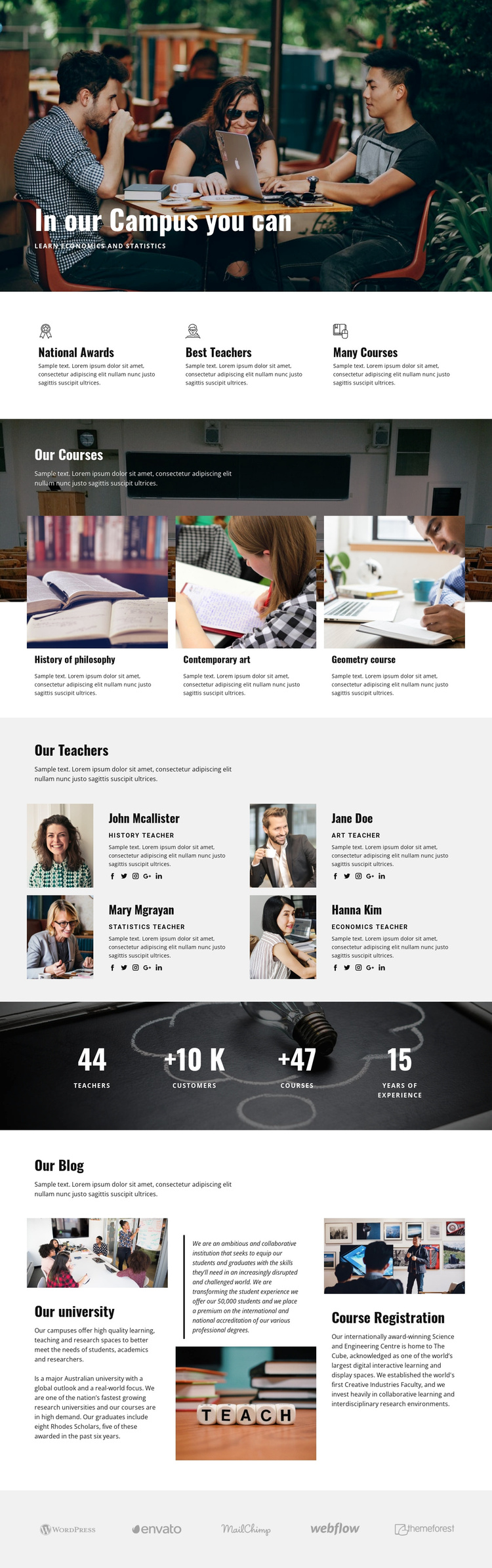
The three course cards create a clear educational content group, while the four teacher profiles provide a separate people-focused region with portraits, roles, descriptions, and social links. The distinction matters for a CMS-managed campus site because course information and staff information can remain visually coordinated without becoming one undifferentiated list. The three feature items add another concise layer for institutional strengths such as awards, teachers, and course variety.
The three blog-style areas broaden the content structure beyond the course grid. Their subjects include the university and course registration, so they can support recurring informational material around the more stable campus sections. The dark metrics band and the lower row of five logo marks provide additional shared regions: one emphasizes labeled institutional figures as structural content, while the other groups associated marks near the end of the page. These are interpreted as content areas, not as verified Joomla Articles or modules already present in the template.
For a Joomla project, the design therefore offers a practical relationship between navigation, structured education information, editorial material, and contact or registration context. The page can retain its academic visual character while content is organized through the CMS, with the existing sections serving as the guide for separating courses, teachers, institutional information, and associated organizations.
Customize with Nicepage
Open this ready-made template in the Joomla Page Builder and customize it visually in the Nicepage editor. Replace demo content, edit page sections, and adapt the design to your project without rebuilding the template from scratch.
Work With This Template in Joomla
Customize and Install the Joomla Template
Start with this ready-made template instead of building the Joomla design from scratch. Customize its layout, content, typography, images, sections, and other design elements visually in the Nicepage application, then export and install the Joomla Template, Nicepage Extension, and supported content on your Joomla website.
Edit the Template Directly in Joomla
After installation, you can edit the Joomla Template directly in Joomla with the Nicepage Joomla Extension. Customize the Header, Footer, Colors, Fonts, typography, and Page Templates from the Joomla workflow while keeping the site design connected with your CMS content.
Edit Joomla Articles Visually
Use the Nicepage Joomla Extension to open and edit Joomla Articles visually from the Joomla Administrator. Change text, images, sections, layouts, and other page content in the Nicepage editor while continuing to manage the Articles through Joomla.
Joomla Content and Template Integration
Use the customized template together with Joomla Articles, module Positions, menus, forms, Blog Pages, and other supported CMS elements. With the Nicepage Extension used as the Site Style Source, shared design settings can be applied across Joomla Articles while Joomla continues to provide the CMS environment for managing site content.
This workflow combines a ready-made Joomla Template with visual customization, direct template editing in Joomla, and continued content management through the Nicepage Joomla Extension.