Choose your plan WordPress Theme


Aligned package data fits stable WordPress page content
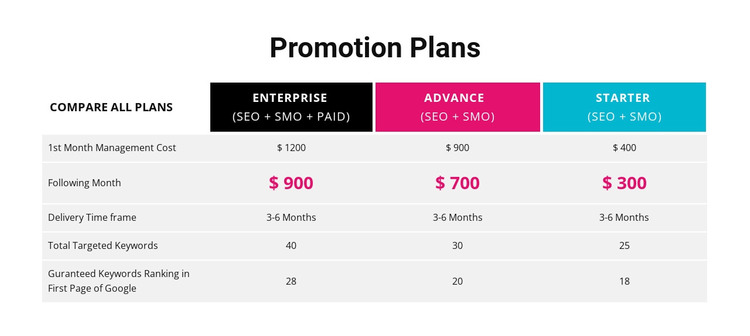
The centered “Promotion Plans” heading and four-column table read as stable informational content rather than a stream of dated editorial entries. In a WordPress-oriented project, the block can occupy a services or pricing area on a managed page while the broader site handles its other content separately. Its internal arrangement remains consistent: a comparison column is aligned with the Enterprise, Advance, and Starter plan columns, and five criteria rows connect equivalent information across them.
Enterprise is labeled SEO + SMO + PAID, whereas Advance and Starter are labeled SEO + SMO. Each plan includes first-month and following-month management costs, and all three show a 3-6 Months delivery time frame. The table also displays ranking figures of 28, 20, and 18. These values belong to the presented comparison structure and can be revised as page content when the surrounding project requires updated information.
The colored plan headers—black, magenta, and cyan—help preserve the section’s identity inside a wider page design. Alternating light-gray rows and white separators keep the repeated data readable. As a WordPress Theme context, the useful role is a reusable page-content region that can remain visually consistent while the site’s wider publishing environment manages other pages and content.
Customize with Nicepage
Open this ready-made template in the WordPress Website Builder and customize it visually in the Nicepage editor. Replace demo content, edit page sections, and adapt the design to your project without rebuilding the template from scratch.
Edit Template Offline
2. Create a new page or select existing
3. Click Add new block, search for id 87804 and click enter
Edit Template Online
Create Awesome Websites


Free Nicepage Builder
Keywords
Manage and Edit This Theme in WordPress
Customize and Install the WordPress Theme
Start with this ready-made theme instead of building the WordPress design from scratch. Customize its layout, content, typography, images, sections, and other design elements visually in Nicepage editor, then export and install the WordPress Theme, Plugin, and Pages on your WordPress site. The Nicepage WordPress Plugin lets you continue working with the site after installation.
Edit the Theme Directly in WordPress
After installation, you can edit the WordPress Theme directly in WordPress with the Nicepage WordPress Plugin. Use Site Style to customize site Colors, Fonts, Header, Footer, Blog, and Post Page Templates while working within your WordPress website.
Edit WordPress Pages Visually
Use the Nicepage WordPress Plugin to edit page content directly from the WordPress admin area. Open a WordPress Page with Nicepage and visually change its text, images, sections, and other page elements while continuing to manage the Page through WordPress.
WordPress Content and Theme Integration
Use the customized theme with WordPress Pages, Posts, Blog and Post Templates, menus, widgets, and other CMS-managed content. Shared theme elements such as Colors, Fonts, Header, Footer, Blog, and Post Page Templates can be managed as part of the overall site design, while WordPress provides the CMS environment for managing site content.
This workflow combines a ready-made WordPress Theme with visual customization, direct theme editing in WordPress, and continued content management through the Nicepage WordPress Plugin.