Title and two texts with a button WordPress Theme


A Stable Service-Content Pattern for WordPress Pages
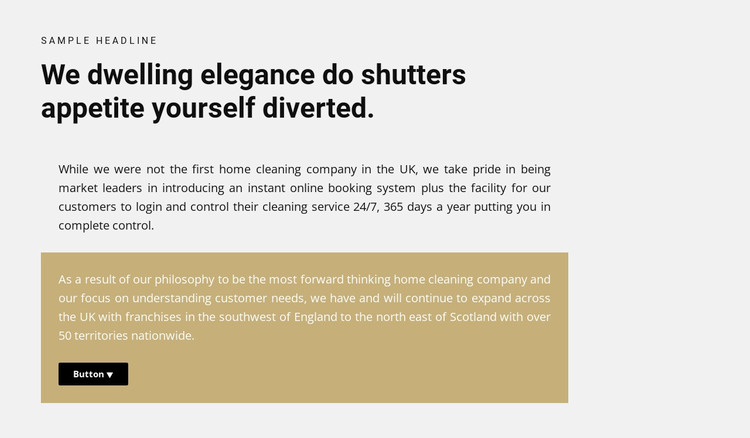
The heading stack gives this section a strong permanent-content structure: a small eyebrow label introduces the subject, the larger heading states the central message, and two paragraphs develop the explanation below. The single-column arrangement keeps those parts in one readable sequence, which suits information that should remain visible as part of a WordPress-managed page rather than behave like a changing feed.
The two paragraphs are not treated identically. The first sits in the main light gray field, while the second is placed in a muted gold panel with white text. That shift creates a natural distinction between the opening explanation and the later supporting point. The dark rounded button inside the panel adds a compact response cue, but its presence does not make the block a complete conversion path; it remains one self-contained section that can direct attention toward a related action.
Within a WordPress-oriented project, this pattern can serve as stable page content for a home-cleaning service or a comparable service description. Other CMS-managed content can surround it with additional sections, while this block preserves its own heading, explanatory copy, highlighted message, and button relationship. The design is especially useful when a page needs more narrative detail than a short card row but still benefits from a concise, visually separated closing panel.
Customize with Nicepage
Open this ready-made template in the WordPress Website Builder and customize it visually in the Nicepage editor. Replace demo content, edit page sections, and adapt the design to your project without rebuilding the template from scratch.
Edit Template Offline
2. Create a new page or select existing
3. Click Add new block, search for id 749486 and click enter
Edit Template Online
Create Awesome Websites


Free Nicepage Builder
Keywords
Manage and Edit This Theme in WordPress
Customize and Install the WordPress Theme
Start with this ready-made theme instead of building the WordPress design from scratch. Customize its layout, content, typography, images, sections, and other design elements visually in Nicepage editor, then export and install the WordPress Theme, Plugin, and Pages on your WordPress site. The Nicepage WordPress Plugin lets you continue working with the site after installation.
Edit the Theme Directly in WordPress
After installation, you can edit the WordPress Theme directly in WordPress with the Nicepage WordPress Plugin. Use Site Style to customize site Colors, Fonts, Header, Footer, Blog, and Post Page Templates while working within your WordPress website.
Edit WordPress Pages Visually
Use the Nicepage WordPress Plugin to edit page content directly from the WordPress admin area. Open a WordPress Page with Nicepage and visually change its text, images, sections, and other page elements while continuing to manage the Page through WordPress.
WordPress Content and Theme Integration
Use the customized theme with WordPress Pages, Posts, Blog and Post Templates, menus, widgets, and other CMS-managed content. Shared theme elements such as Colors, Fonts, Header, Footer, Blog, and Post Page Templates can be managed as part of the overall site design, while WordPress provides the CMS environment for managing site content.
This workflow combines a ready-made WordPress Theme with visual customization, direct theme editing in WordPress, and continued content management through the Nicepage WordPress Plugin.