Colored columns with icons WordPress Theme


The WordPress Card Leads a Stable Page-Content Comparison
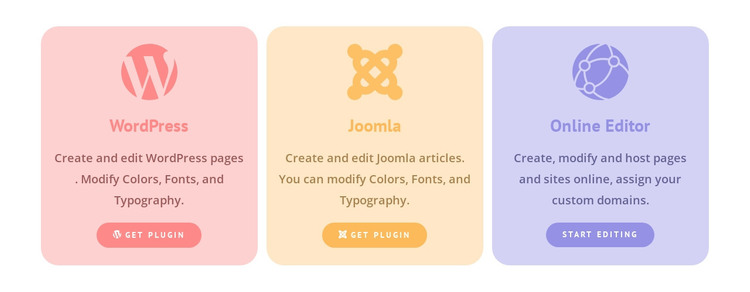
The WordPress card can function as a stable page-content section within a WordPress-managed site, while the neighboring cards explain alternative routes. Its equal-column arrangement keeps WordPress from becoming an isolated promotion: visitors see it alongside Joomla and Online Editor, with each option receiving the same icon, title, descriptive area, and action-button treatment.
The WordPress-specific message centers on creating and editing WordPress pages and modifying colors, fonts, and typography. That page-oriented content is distinct from Joomla’s article wording and from Online Editor’s emphasis on browser-based creation, hosting, and custom domain assignment. The “Get Plugin” label on the WordPress card supports a platform-access interpretation, and the matching label on Joomla creates a useful visual pairing. “Start Editing” gives the online option a separate action cue.
In a broader WordPress project, the block can occupy a reusable features or platform-options region without becoming a WordPress Theme itself. Its pastel cards and centered hierarchy make the comparison easy to scan, while the rounded buttons provide visible next steps. Other content areas can supply the site’s navigation, introductory explanation, detailed documentation, or additional conversion actions around this focused section.
Customize with Nicepage
Open this ready-made template in the WordPress Website Builder and customize it visually in the Nicepage editor. Replace demo content, edit page sections, and adapt the design to your project without rebuilding the template from scratch.
Edit Template Offline
2. Create a new page or select existing
3. Click Add new block, search for id 740041 and click enter
Edit Template Online
Create Awesome Websites


Free Nicepage Builder
Keywords
Manage and Edit This Theme in WordPress
Customize and Install the WordPress Theme
Start with this ready-made theme instead of building the WordPress design from scratch. Customize its layout, content, typography, images, sections, and other design elements visually in Nicepage editor, then export and install the WordPress Theme, Plugin, and Pages on your WordPress site. The Nicepage WordPress Plugin lets you continue working with the site after installation.
Edit the Theme Directly in WordPress
After installation, you can edit the WordPress Theme directly in WordPress with the Nicepage WordPress Plugin. Use Site Style to customize site Colors, Fonts, Header, Footer, Blog, and Post Page Templates while working within your WordPress website.
Edit WordPress Pages Visually
Use the Nicepage WordPress Plugin to edit page content directly from the WordPress admin area. Open a WordPress Page with Nicepage and visually change its text, images, sections, and other page elements while continuing to manage the Page through WordPress.
WordPress Content and Theme Integration
Use the customized theme with WordPress Pages, Posts, Blog and Post Templates, menus, widgets, and other CMS-managed content. Shared theme elements such as Colors, Fonts, Header, Footer, Blog, and Post Page Templates can be managed as part of the overall site design, while WordPress provides the CMS environment for managing site content.
This workflow combines a ready-made WordPress Theme with visual customization, direct theme editing in WordPress, and continued content management through the Nicepage WordPress Plugin.