Sunday brunch or breakfast WordPress Theme


Three Stable Guidance Cards for Page Content
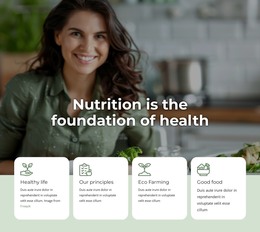
The three cards read as a durable informational section suitable for a WordPress-managed page. Their headings identify separate healthy-eating recommendations, while the supporting paragraphs provide space to maintain the explanation associated with each point. Because every card uses the same icon-heading-paragraph sequence, the content can be reviewed and updated as comparable units without losing the relationship between the three recommendations.
The layout gives this page content a strong visual container. White rectangular cards stand in front of a dark food photograph, and the centered alignment keeps each recommendation focused within its own column. The full-width image supplies a shared setting rather than competing with the text, while the outlined icons establish a repeated cue above each heading. Together, these choices make the section feel coherent when placed among other content areas on a health or food-related page.
In a WordPress-oriented project, the block can hold permanent guidance content on a suitable page while neighboring areas carry introductions, recipes, menus, or contact information. Its practical value comes from presenting three related points with equal emphasis, not from acting as a changing post stream. The section’s stable card structure also gives editors a clear visual framework when adapting the wording and supporting explanations to the wider site.
Customize with Nicepage
Open this ready-made template in the WordPress Website Builder and customize it visually in the Nicepage editor. Replace demo content, edit page sections, and adapt the design to your project without rebuilding the template from scratch.
Edit Template Offline
2. Create a new page or select existing
3. Click Add new block, search for id 65689 and click enter
Edit Template Online
Create Awesome Websites


Free Nicepage Builder
Keywords
Manage and Edit This Theme in WordPress
Customize and Install the WordPress Theme
Start with this ready-made theme instead of building the WordPress design from scratch. Customize its layout, content, typography, images, sections, and other design elements visually in Nicepage editor, then export and install the WordPress Theme, Plugin, and Pages on your WordPress site. The Nicepage WordPress Plugin lets you continue working with the site after installation.
Edit the Theme Directly in WordPress
After installation, you can edit the WordPress Theme directly in WordPress with the Nicepage WordPress Plugin. Use Site Style to customize site Colors, Fonts, Header, Footer, Blog, and Post Page Templates while working within your WordPress website.
Edit WordPress Pages Visually
Use the Nicepage WordPress Plugin to edit page content directly from the WordPress admin area. Open a WordPress Page with Nicepage and visually change its text, images, sections, and other page elements while continuing to manage the Page through WordPress.
WordPress Content and Theme Integration
Use the customized theme with WordPress Pages, Posts, Blog and Post Templates, menus, widgets, and other CMS-managed content. Shared theme elements such as Colors, Fonts, Header, Footer, Blog, and Post Page Templates can be managed as part of the overall site design, while WordPress provides the CMS environment for managing site content.
This workflow combines a ready-made WordPress Theme with visual customization, direct theme editing in WordPress, and continued content management through the Nicepage WordPress Plugin.