Design Surveys That Work WordPress Theme


The centered questionnaire works as stable feedback content on a WordPress page
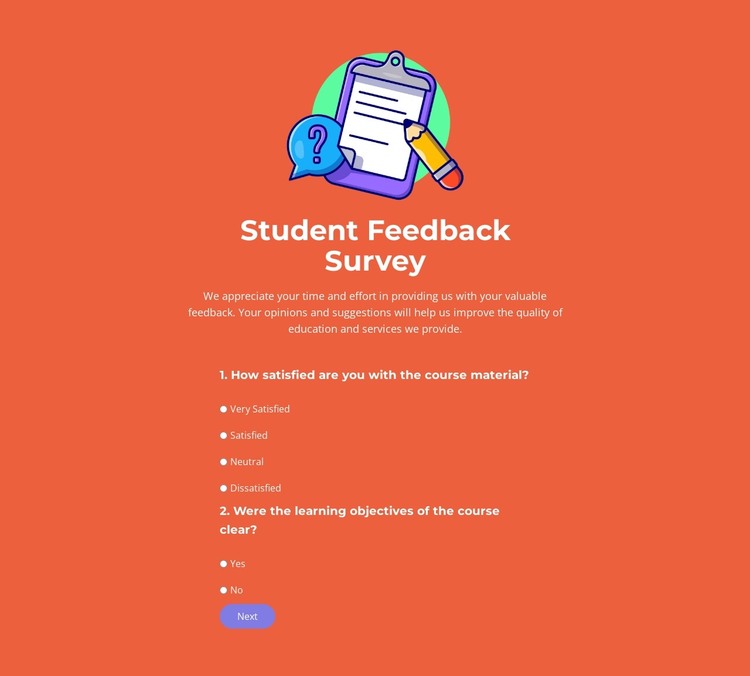
The illustration and centered introduction make the block read as a defined piece of page content before the form interaction begins. The “Student Feedback Survey” heading identifies the subject, while the supporting paragraph provides context for the four radio-choice question groups below. These sample questions are structural content for a survey layout; they can be replaced with the project’s own feedback prompts while retaining the same relationship between explanation and response.
Within a WordPress-oriented project, the section can occupy a stable area of a page that collects educational or service feedback. Its two carousel steps keep the questionnaire compact, with Next and Back controlling progression and Submit providing the final response action. That page-content interpretation differs from a site-wide theme role: the block contributes one reusable visual region, while the surrounding WordPress project supplies other pages, publishing context, and broader content management.
The visual structure supports this role without adding unnecessary density. A bright orange background separates the section from neighboring content, the colorful illustration creates an immediate entry cue, and centered white content keeps the question groups readable. The rounded purple action button gives the completion point a distinct accent. The result is a self-contained survey area that can be coordinated with a WordPress-managed page while remaining limited to its own verified questionnaire function.
Customize with Nicepage
Open this ready-made template in the WordPress Website Builder and customize it visually in the Nicepage editor. Replace demo content, edit page sections, and adapt the design to your project without rebuilding the template from scratch.
Edit Template Offline
2. Create a new page or select existing
3. Click Add new block, search for id 6537829 and click enter
Edit Template Online
Create Awesome Websites


Free Nicepage Builder
Keywords
Manage and Edit This Theme in WordPress
Customize and Install the WordPress Theme
Start with this ready-made theme instead of building the WordPress design from scratch. Customize its layout, content, typography, images, sections, and other design elements visually in Nicepage editor, then export and install the WordPress Theme, Plugin, and Pages on your WordPress site. The Nicepage WordPress Plugin lets you continue working with the site after installation.
Edit the Theme Directly in WordPress
After installation, you can edit the WordPress Theme directly in WordPress with the Nicepage WordPress Plugin. Use Site Style to customize site Colors, Fonts, Header, Footer, Blog, and Post Page Templates while working within your WordPress website.
Edit WordPress Pages Visually
Use the Nicepage WordPress Plugin to edit page content directly from the WordPress admin area. Open a WordPress Page with Nicepage and visually change its text, images, sections, and other page elements while continuing to manage the Page through WordPress.
WordPress Content and Theme Integration
Use the customized theme with WordPress Pages, Posts, Blog and Post Templates, menus, widgets, and other CMS-managed content. Shared theme elements such as Colors, Fonts, Header, Footer, Blog, and Post Page Templates can be managed as part of the overall site design, while WordPress provides the CMS environment for managing site content.
This workflow combines a ready-made WordPress Theme with visual customization, direct theme editing in WordPress, and continued content management through the Nicepage WordPress Plugin.