We will help you get in touch WordPress Theme


Stable Contact Content With a Clear Page-Section Role
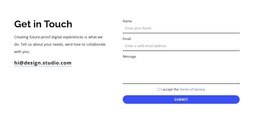
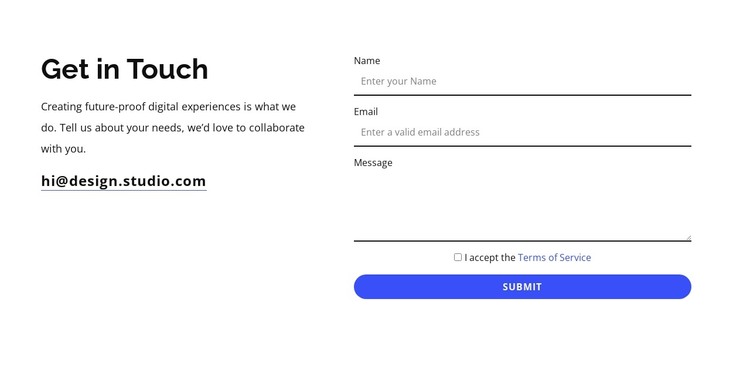
The heading “Get in Touch” gives this block a direct and recognizable page-content purpose. Beside it, the supporting paragraph frames the section around digital experiences and collaboration, while the email link provides a simple contact route. The form on the right turns that invitation into a structured inquiry area with fields for a visitor’s name, email, and message. A Terms of Service checkbox precedes the Submit control, making the response sequence visible within the same section.
In a WordPress-oriented project, this arrangement can function as permanent contact content on a services, studio, or inquiry page while other CMS-managed areas provide the rest of the site’s information. The block’s value comes from the relationship between explanation and response: visitors see why they are being invited to make contact before encountering the fields needed to continue. The form and introduction remain distinct without becoming unrelated columns.
The visual treatment reinforces that stable role. Bold typography gives the left side a strong starting point, thin underlined inputs keep the form orderly, and generous whitespace prevents the content from feeling crowded. The blue rounded button identifies the main response action against the restrained black-and-white base. This makes the block suitable as a reusable contact section within WordPress-managed page content, while the surrounding theme and wider site supply navigation and additional sections.
Customize with Nicepage
Open this ready-made template in the WordPress Website Builder and customize it visually in the Nicepage editor. Replace demo content, edit page sections, and adapt the design to your project without rebuilding the template from scratch.
Edit Template Offline
2. Create a new page or select existing
3. Click Add new block, search for id 6452219 and click enter
Edit Template Online
Create Awesome Websites


Free Nicepage Builder
Keywords
Manage and Edit This Theme in WordPress
Customize and Install the WordPress Theme
Start with this ready-made theme instead of building the WordPress design from scratch. Customize its layout, content, typography, images, sections, and other design elements visually in Nicepage editor, then export and install the WordPress Theme, Plugin, and Pages on your WordPress site. The Nicepage WordPress Plugin lets you continue working with the site after installation.
Edit the Theme Directly in WordPress
After installation, you can edit the WordPress Theme directly in WordPress with the Nicepage WordPress Plugin. Use Site Style to customize site Colors, Fonts, Header, Footer, Blog, and Post Page Templates while working within your WordPress website.
Edit WordPress Pages Visually
Use the Nicepage WordPress Plugin to edit page content directly from the WordPress admin area. Open a WordPress Page with Nicepage and visually change its text, images, sections, and other page elements while continuing to manage the Page through WordPress.
WordPress Content and Theme Integration
Use the customized theme with WordPress Pages, Posts, Blog and Post Templates, menus, widgets, and other CMS-managed content. Shared theme elements such as Colors, Fonts, Header, Footer, Blog, and Post Page Templates can be managed as part of the overall site design, while WordPress provides the CMS environment for managing site content.
This workflow combines a ready-made WordPress Theme with visual customization, direct theme editing in WordPress, and continued content management through the Nicepage WordPress Plugin.