24hr veterinary advice WordPress Theme


Four Care Categories Form Stable WordPress Page Content
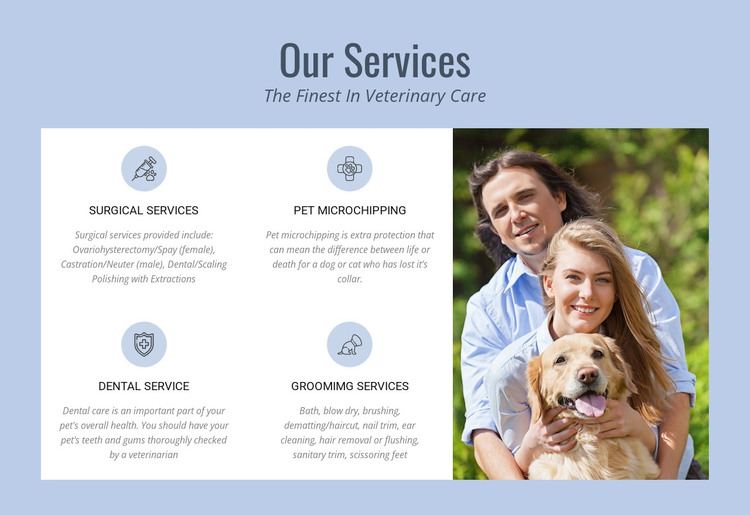
The heading “Our Services” introduces a compact area of permanent veterinary information, while “The Finest In Veterinary Care” provides a clear supporting message. The section then divides its content into four service cards: surgical services, pet microchipping, Dental Service, and Groomimg Services. Their descriptions are specific enough to distinguish the care categories, including references to spay and neuter procedures, identification protection for lost pets, veterinary checks of teeth and gums, and practical grooming such as bathing, brushing, haircuts, nail trimming, and ear cleaning.
For a WordPress-managed page, this content reads primarily as a stable services area rather than a time-sensitive article stream. The two-by-two card arrangement gives each offering a defined visual position, making the section suitable for a veterinary services page while other CMS-managed content can address the practice, staff, contact details, or further information. The tall photograph of two adults with a dog reinforces the pet-care context without carrying the service explanations by itself.
The visual system also supports consistent page content: dark blue typography remains legible against the pale blue section background, white cards separate the service summaries, and light blue circular icon backgrounds create a repeated cue across the four items. The block can retain this structure as one reusable WordPress page section while the surrounding project supplies broader site organization.
Customize with Nicepage
Open this ready-made template in the WordPress Website Builder and customize it visually in the Nicepage editor. Replace demo content, edit page sections, and adapt the design to your project without rebuilding the template from scratch.
Edit Template Offline
2. Create a new page or select existing
3. Click Add new block, search for id 62568 and click enter
Edit Template Online
Create Awesome Websites


Free Nicepage Builder
Keywords
Manage and Edit This Theme in WordPress
Customize and Install the WordPress Theme
Start with this ready-made theme instead of building the WordPress design from scratch. Customize its layout, content, typography, images, sections, and other design elements visually in Nicepage editor, then export and install the WordPress Theme, Plugin, and Pages on your WordPress site. The Nicepage WordPress Plugin lets you continue working with the site after installation.
Edit the Theme Directly in WordPress
After installation, you can edit the WordPress Theme directly in WordPress with the Nicepage WordPress Plugin. Use Site Style to customize site Colors, Fonts, Header, Footer, Blog, and Post Page Templates while working within your WordPress website.
Edit WordPress Pages Visually
Use the Nicepage WordPress Plugin to edit page content directly from the WordPress admin area. Open a WordPress Page with Nicepage and visually change its text, images, sections, and other page elements while continuing to manage the Page through WordPress.
WordPress Content and Theme Integration
Use the customized theme with WordPress Pages, Posts, Blog and Post Templates, menus, widgets, and other CMS-managed content. Shared theme elements such as Colors, Fonts, Header, Footer, Blog, and Post Page Templates can be managed as part of the overall site design, while WordPress provides the CMS environment for managing site content.
This workflow combines a ready-made WordPress Theme with visual customization, direct theme editing in WordPress, and continued content management through the Nicepage WordPress Plugin.