Connect with us WordPress Theme


Stable Contact Content With a Separate WordPress Page Role
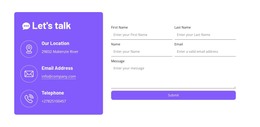
The block’s content divides naturally into permanent information and visitor input. The blue panel can hold stable contact content through the “Get in Touch” heading, supporting copy, and three vertically stacked detail groups for chat or email, office, and phone. Four social links remain together beneath those details, creating a distinct supporting group rather than scattering social destinations through the form. This side of the block can retain its visual role even as surrounding page content changes.
The white panel is organized around the visitor’s response. “Level up your brand” introduces name and email inputs, three checkbox choices, consent wording, and a submit control. That combination makes the section suitable for a WordPress-managed services, about, or contact page when the project needs a stable inquiry area alongside other page content. The orange rounded button identifies the form’s endpoint, while the blue and white panels keep the information architecture understandable without requiring the section to carry site-wide navigation or theme structure.
Nicepage’s WordPress Theme, Plugin, and Pages workflow provides a broader CMS context for pages and design. The relevant interpretation here is narrower: this block can serve as reusable contact content within that environment, while WordPress manages the surrounding pages and publishing structure.
Customize with Nicepage
Open this ready-made template in the WordPress Website Builder and customize it visually in the Nicepage editor. Replace demo content, edit page sections, and adapt the design to your project without rebuilding the template from scratch.
Edit Template Offline
2. Create a new page or select existing
3. Click Add new block, search for id 6188625 and click enter
Edit Template Online
Create Awesome Websites


Free Nicepage Builder
Keywords
Manage and Edit This Theme in WordPress
Customize and Install the WordPress Theme
Start with this ready-made theme instead of building the WordPress design from scratch. Customize its layout, content, typography, images, sections, and other design elements visually in Nicepage editor, then export and install the WordPress Theme, Plugin, and Pages on your WordPress site. The Nicepage WordPress Plugin lets you continue working with the site after installation.
Edit the Theme Directly in WordPress
After installation, you can edit the WordPress Theme directly in WordPress with the Nicepage WordPress Plugin. Use Site Style to customize site Colors, Fonts, Header, Footer, Blog, and Post Page Templates while working within your WordPress website.
Edit WordPress Pages Visually
Use the Nicepage WordPress Plugin to edit page content directly from the WordPress admin area. Open a WordPress Page with Nicepage and visually change its text, images, sections, and other page elements while continuing to manage the Page through WordPress.
WordPress Content and Theme Integration
Use the customized theme with WordPress Pages, Posts, Blog and Post Templates, menus, widgets, and other CMS-managed content. Shared theme elements such as Colors, Fonts, Header, Footer, Blog, and Post Page Templates can be managed as part of the overall site design, while WordPress provides the CMS environment for managing site content.
This workflow combines a ready-made WordPress Theme with visual customization, direct theme editing in WordPress, and continued content management through the Nicepage WordPress Plugin.