All art programs for kids WordPress Theme


Six Stable Program Summaries for Managed Page Content
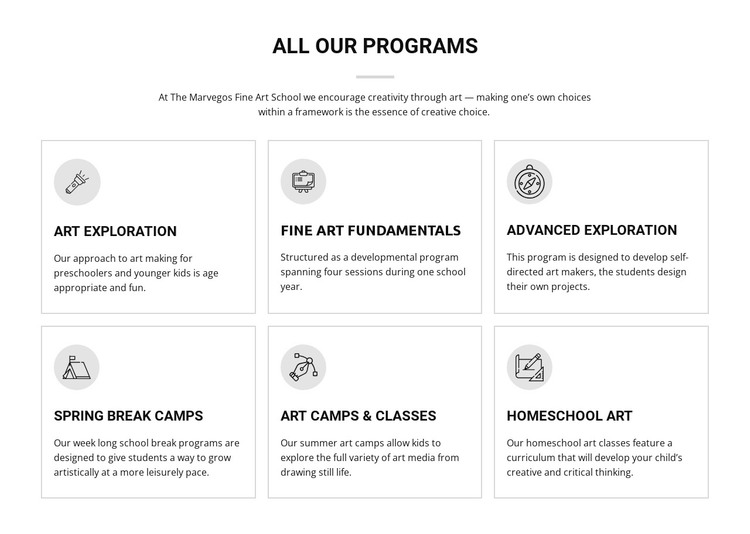
The block’s content reads as a durable programs section: a centered “all our programs” heading introduces six named offerings, and each offering receives a concise explanatory card. Art Exploration, Fine Art Fundamentals, Advanced Exploration, Spring Break Camps, Art Camps & Classes, and Homeschool Art are presented as parallel information units rather than as a stream of dated updates. That makes the section suitable for stable page content in a WordPress-managed project when an art education site needs a clear overview of its programs.
The two-row, three-column grid gives the content a predictable structure for visitors and editors. Each repeated card contains a circular icon, bold title, and supporting paragraph, while light gray borders keep the six items visually separated. The white background and black typography maintain a neutral presentation that can sit alongside other page sections without requiring a different content model for every program.
In a broader WordPress-oriented site, this block can serve as the visual programs area while other managed page content handles fuller descriptions, schedules, enrollment information, or related educational material. The section itself remains focused on concise summaries. Its usefulness comes from preserving a recognizable group of six offerings and a consistent card pattern, so the visual arrangement can remain steady even as surrounding content grows. The block participates in the managed page; it is not a standalone theme or complete site.
Customize with Nicepage
Open this ready-made template in the WordPress Website Builder and customize it visually in the Nicepage editor. Replace demo content, edit page sections, and adapt the design to your project without rebuilding the template from scratch.
Edit Template Offline
2. Create a new page or select existing
3. Click Add new block, search for id 60473 and click enter
Edit Template Online
Create Awesome Websites


Free Nicepage Builder
Keywords
Manage and Edit This Theme in WordPress
Customize and Install the WordPress Theme
Start with this ready-made theme instead of building the WordPress design from scratch. Customize its layout, content, typography, images, sections, and other design elements visually in Nicepage editor, then export and install the WordPress Theme, Plugin, and Pages on your WordPress site. The Nicepage WordPress Plugin lets you continue working with the site after installation.
Edit the Theme Directly in WordPress
After installation, you can edit the WordPress Theme directly in WordPress with the Nicepage WordPress Plugin. Use Site Style to customize site Colors, Fonts, Header, Footer, Blog, and Post Page Templates while working within your WordPress website.
Edit WordPress Pages Visually
Use the Nicepage WordPress Plugin to edit page content directly from the WordPress admin area. Open a WordPress Page with Nicepage and visually change its text, images, sections, and other page elements while continuing to manage the Page through WordPress.
WordPress Content and Theme Integration
Use the customized theme with WordPress Pages, Posts, Blog and Post Templates, menus, widgets, and other CMS-managed content. Shared theme elements such as Colors, Fonts, Header, Footer, Blog, and Post Page Templates can be managed as part of the overall site design, while WordPress provides the CMS environment for managing site content.
This workflow combines a ready-made WordPress Theme with visual customization, direct theme editing in WordPress, and continued content management through the Nicepage WordPress Plugin.