Healthy restaurant meals WordPress Theme


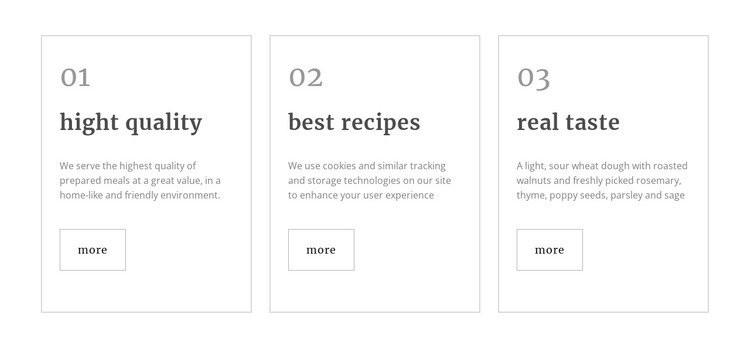
The numbered feature row keeps three content themes distinct
The three repeated cards work well as stable page content in a WordPress-managed project because each one represents a separate feature theme without breaking the shared visual pattern. “High quality,” “best recipes,” and “real taste” can introduce three related aspects of a food-service offering, while the 01, 02, and 03 labels make their relationship immediately legible. The descriptions provide room for supporting detail, and the matching “more” links leave each theme open to a deeper destination elsewhere in the surrounding project.
The content model is especially clear because every card follows the same sequence: number, heading, description, then link. Thin borders divide the three equal-width areas, and consistent left alignment prevents the row from becoming a loose collection of unrelated statements. Large muted numerals add hierarchy above the dark serif headings, while the smaller gray text keeps the explanatory material visually secondary. This makes the block suitable for a permanent features or services-related area where the wording may be maintained as part of broader page content.
In WordPress-oriented use, the section can remain a visually consistent content region while other parts of the project handle menus, additional pages, or changing editorial material. Its static interaction also keeps the meaning visible at once: visitors can compare all three highlights before choosing a “more” link, rather than opening panels or moving through a carousel.
Customize with Nicepage
Open this ready-made template in the WordPress Website Builder and customize it visually in the Nicepage editor. Replace demo content, edit page sections, and adapt the design to your project without rebuilding the template from scratch.
Edit Template Offline
2. Create a new page or select existing
3. Click Add new block, search for id 55807 and click enter
Edit Template Online
Create Awesome Websites


Free Nicepage Builder
Keywords
Manage and Edit This Theme in WordPress
Customize and Install the WordPress Theme
Start with this ready-made theme instead of building the WordPress design from scratch. Customize its layout, content, typography, images, sections, and other design elements visually in Nicepage editor, then export and install the WordPress Theme, Plugin, and Pages on your WordPress site. The Nicepage WordPress Plugin lets you continue working with the site after installation.
Edit the Theme Directly in WordPress
After installation, you can edit the WordPress Theme directly in WordPress with the Nicepage WordPress Plugin. Use Site Style to customize site Colors, Fonts, Header, Footer, Blog, and Post Page Templates while working within your WordPress website.
Edit WordPress Pages Visually
Use the Nicepage WordPress Plugin to edit page content directly from the WordPress admin area. Open a WordPress Page with Nicepage and visually change its text, images, sections, and other page elements while continuing to manage the Page through WordPress.
WordPress Content and Theme Integration
Use the customized theme with WordPress Pages, Posts, Blog and Post Templates, menus, widgets, and other CMS-managed content. Shared theme elements such as Colors, Fonts, Header, Footer, Blog, and Post Page Templates can be managed as part of the overall site design, while WordPress provides the CMS environment for managing site content.
This workflow combines a ready-made WordPress Theme with visual customization, direct theme editing in WordPress, and continued content management through the Nicepage WordPress Plugin.