Our top specialists WordPress Theme


Four Profile Cards Create Stable Team Content
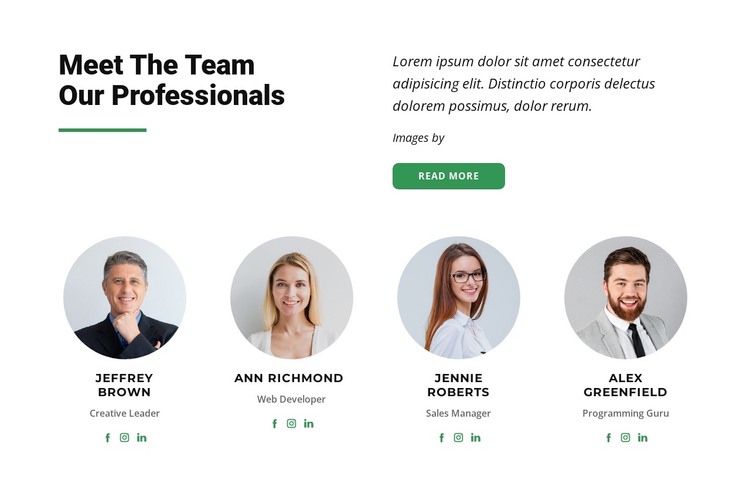
The split introduction gives this section a clear page-content role before visitors reach the repeated profiles. “Meet The Team Our Professionals” states the subject, while the green divider reinforces the heading and the supporting paragraph adds context beside a “read more” action. This arrangement works well for a stable team or about-related content area because the section can explain its purpose without depending on a separate article feed or changing post list.
The lower row provides four consistent entries, each built from a circular portrait, a name, a role label, and social links. The visible labels—Creative Leader, Web Developer, Sales Manager, and Programming Guru—show how the cards can organize people by responsibility. Facebook, Instagram, and LinkedIn icons repeat across the entries, giving every profile the same connection treatment. The sample names and roles can be replaced with the page’s own content while the four-card structure remains intact.
In a WordPress-oriented project, this block can serve as permanent team content on a page managed alongside other site material. Its centered cards and generous spacing make the people easy to scan, while the white background, black typography, and green accent can align with the surrounding visual direction. The section contributes a focused team area; the wider WordPress project remains responsible for other pages, navigation, and publishing context.
Customize with Nicepage
Open this ready-made template in the WordPress Website Builder and customize it visually in the Nicepage editor. Replace demo content, edit page sections, and adapt the design to your project without rebuilding the template from scratch.
Edit Template Offline
2. Create a new page or select existing
3. Click Add new block, search for id 525019 and click enter
Edit Template Online
Create Awesome Websites


Free Nicepage Builder
Keywords
Manage and Edit This Theme in WordPress
Customize and Install the WordPress Theme
Start with this ready-made theme instead of building the WordPress design from scratch. Customize its layout, content, typography, images, sections, and other design elements visually in Nicepage editor, then export and install the WordPress Theme, Plugin, and Pages on your WordPress site. The Nicepage WordPress Plugin lets you continue working with the site after installation.
Edit the Theme Directly in WordPress
After installation, you can edit the WordPress Theme directly in WordPress with the Nicepage WordPress Plugin. Use Site Style to customize site Colors, Fonts, Header, Footer, Blog, and Post Page Templates while working within your WordPress website.
Edit WordPress Pages Visually
Use the Nicepage WordPress Plugin to edit page content directly from the WordPress admin area. Open a WordPress Page with Nicepage and visually change its text, images, sections, and other page elements while continuing to manage the Page through WordPress.
WordPress Content and Theme Integration
Use the customized theme with WordPress Pages, Posts, Blog and Post Templates, menus, widgets, and other CMS-managed content. Shared theme elements such as Colors, Fonts, Header, Footer, Blog, and Post Page Templates can be managed as part of the overall site design, while WordPress provides the CMS environment for managing site content.
This workflow combines a ready-made WordPress Theme with visual customization, direct theme editing in WordPress, and continued content management through the Nicepage WordPress Plugin.