Workout app for tracking WordPress Theme


Stable App Feature Content Around a Publishable Product Visual
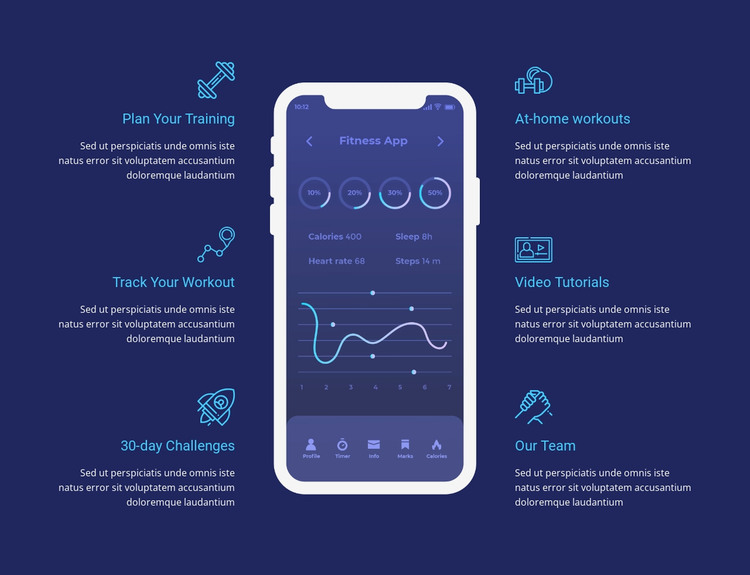
The six feature items form stable page-oriented content for a fitness app section. Their labels identify distinct capabilities—training plans, workout tracking, challenges, at-home workouts, video tutorials, and team support—while the repeated icon-and-text pattern keeps the information visually consistent. The centered mobile interface gives the content a product reference and visibly includes calories, sleep, heart rate, steps, and a chart. These elements can remain together as one coherent content area while other parts of a WordPress-managed site handle navigation, editorial material, or additional pages.
The WordPress Theme interpretation is therefore about how this section can participate in a wider managed page, not about turning the block into a complete theme. Its dark navy background and cyan accents provide a defined visual region that can remain consistent as the surrounding project changes. The three-item columns also make the feature information easy to maintain as grouped content: related labels and descriptions stay aligned around the same app visual. This makes the block suitable for permanent product or service information while broader WordPress content grows around it.
Customize with Nicepage
Open this ready-made template in the WordPress Website Builder and customize it visually in the Nicepage editor. Replace demo content, edit page sections, and adapt the design to your project without rebuilding the template from scratch.
Edit Template Offline
2. Create a new page or select existing
3. Click Add new block, search for id 46717 and click enter
Edit Template Online
Create Awesome Websites


Free Nicepage Builder
Keywords
Manage and Edit This Theme in WordPress
Customize and Install the WordPress Theme
Start with this ready-made theme instead of building the WordPress design from scratch. Customize its layout, content, typography, images, sections, and other design elements visually in Nicepage editor, then export and install the WordPress Theme, Plugin, and Pages on your WordPress site. The Nicepage WordPress Plugin lets you continue working with the site after installation.
Edit the Theme Directly in WordPress
After installation, you can edit the WordPress Theme directly in WordPress with the Nicepage WordPress Plugin. Use Site Style to customize site Colors, Fonts, Header, Footer, Blog, and Post Page Templates while working within your WordPress website.
Edit WordPress Pages Visually
Use the Nicepage WordPress Plugin to edit page content directly from the WordPress admin area. Open a WordPress Page with Nicepage and visually change its text, images, sections, and other page elements while continuing to manage the Page through WordPress.
WordPress Content and Theme Integration
Use the customized theme with WordPress Pages, Posts, Blog and Post Templates, menus, widgets, and other CMS-managed content. Shared theme elements such as Colors, Fonts, Header, Footer, Blog, and Post Page Templates can be managed as part of the overall site design, while WordPress provides the CMS environment for managing site content.
This workflow combines a ready-made WordPress Theme with visual customization, direct theme editing in WordPress, and continued content management through the Nicepage WordPress Plugin.