New start is coming WordPress Theme


Launch Content That Keeps Its Message and Signup Together
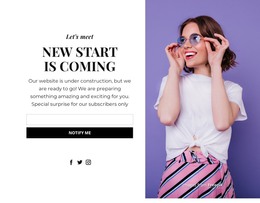
The section reads as a focused piece of permanent page content: a visual announcement paired with a request for an email notification. The left portrait establishes the atmosphere, while the right side gives the content a straightforward reading order through the “Let's meet” label, “New Start Is Coming” heading, and “Notify Me When It's Ready” explanation. The subscription form then provides the practical response point with one email input and a “Notify me” action.
The magenta panel overlapping the portrait adds a strong editorial marker that can help this section retain its identity when placed beside other page content. Three social links beneath the message copy provide a secondary way to stay connected, but they remain visually separate from the main email interaction. Together, the image, announcement hierarchy, social links, and form make the section more specific than a generic text panel.
In a WordPress-oriented project, this block can function as reusable content for a stable announcement or coming-soon area within a larger page. The surrounding site can manage its other pages and content independently, while this section preserves its own visual arrangement and message. The important content logic is therefore page-oriented and publishable: explain the upcoming start, present the supporting image, and give visitors one direct way to request notification.
Customize with Nicepage
Open this ready-made template in the WordPress Website Builder and customize it visually in the Nicepage editor. Replace demo content, edit page sections, and adapt the design to your project without rebuilding the template from scratch.
Edit Template Offline
2. Create a new page or select existing
3. Click Add new block, search for id 301329 and click enter
Edit Template Online
Create Awesome Websites


Free Nicepage Builder
Keywords
Manage and Edit This Theme in WordPress
Customize and Install the WordPress Theme
Start with this ready-made theme instead of building the WordPress design from scratch. Customize its layout, content, typography, images, sections, and other design elements visually in Nicepage editor, then export and install the WordPress Theme, Plugin, and Pages on your WordPress site. The Nicepage WordPress Plugin lets you continue working with the site after installation.
Edit the Theme Directly in WordPress
After installation, you can edit the WordPress Theme directly in WordPress with the Nicepage WordPress Plugin. Use Site Style to customize site Colors, Fonts, Header, Footer, Blog, and Post Page Templates while working within your WordPress website.
Edit WordPress Pages Visually
Use the Nicepage WordPress Plugin to edit page content directly from the WordPress admin area. Open a WordPress Page with Nicepage and visually change its text, images, sections, and other page elements while continuing to manage the Page through WordPress.
WordPress Content and Theme Integration
Use the customized theme with WordPress Pages, Posts, Blog and Post Templates, menus, widgets, and other CMS-managed content. Shared theme elements such as Colors, Fonts, Header, Footer, Blog, and Post Page Templates can be managed as part of the overall site design, while WordPress provides the CMS environment for managing site content.
This workflow combines a ready-made WordPress Theme with visual customization, direct theme editing in WordPress, and continued content management through the Nicepage WordPress Plugin.