Online trainings WordPress Theme


A Stable Training Content Area With Three Supporting Measures
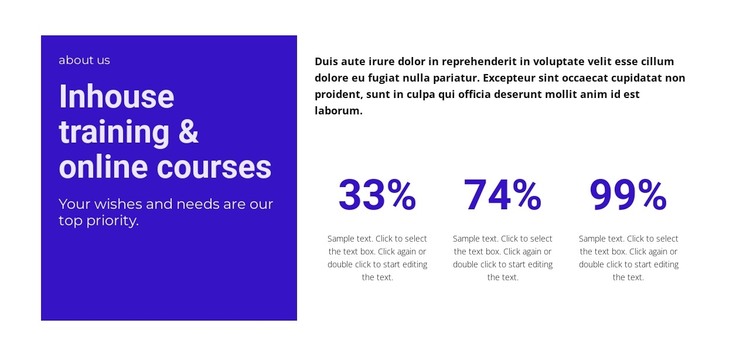
The heading and supporting text give this section a clear page-content role before the metrics appear. On the left, the purple panel groups the “about us” label, “Inhouse training & online courses,” and the statement about prioritizing wishes and needs into one introductory message. White text against the solid color creates a strong visual boundary without separating the panel from the rest of the section.
The right region works differently: its explanatory paragraph supplies context, then three evenly spaced counters create a compact summary row. The displayed values—33%, 74%, and 99%—are sample figures rather than independently established achievements, but they still provide a repeatable content pattern for presenting related training information. The horizontal alignment and generous gaps help the counters read as a coordinated set instead of scattered numbers.
In a WordPress-managed page, this block can serve as durable services or training content within a broader site. Its text and metric descriptions can remain part of a stable page while other CMS-managed areas handle additional content around it. The section is therefore useful for a training page or business information area without needing to carry the complete site structure. Its visual treatment can also remain consistent with related page sections as the surrounding WordPress project develops.
Customize with Nicepage
Open this ready-made template in the WordPress Website Builder and customize it visually in the Nicepage editor. Replace demo content, edit page sections, and adapt the design to your project without rebuilding the template from scratch.
Edit Template Offline
2. Create a new page or select existing
3. Click Add new block, search for id 2227232 and click enter
Edit Template Online
Create Awesome Websites


Free Nicepage Builder
Keywords
Manage and Edit This Theme in WordPress
Customize and Install the WordPress Theme
Start with this ready-made theme instead of building the WordPress design from scratch. Customize its layout, content, typography, images, sections, and other design elements visually in Nicepage editor, then export and install the WordPress Theme, Plugin, and Pages on your WordPress site. The Nicepage WordPress Plugin lets you continue working with the site after installation.
Edit the Theme Directly in WordPress
After installation, you can edit the WordPress Theme directly in WordPress with the Nicepage WordPress Plugin. Use Site Style to customize site Colors, Fonts, Header, Footer, Blog, and Post Page Templates while working within your WordPress website.
Edit WordPress Pages Visually
Use the Nicepage WordPress Plugin to edit page content directly from the WordPress admin area. Open a WordPress Page with Nicepage and visually change its text, images, sections, and other page elements while continuing to manage the Page through WordPress.
WordPress Content and Theme Integration
Use the customized theme with WordPress Pages, Posts, Blog and Post Templates, menus, widgets, and other CMS-managed content. Shared theme elements such as Colors, Fonts, Header, Footer, Blog, and Post Page Templates can be managed as part of the overall site design, while WordPress provides the CMS environment for managing site content.
This workflow combines a ready-made WordPress Theme with visual customization, direct theme editing in WordPress, and continued content management through the Nicepage WordPress Plugin.