Design experience WordPress Theme


Discover, Prototyping, and Creation as Reusable Page Content
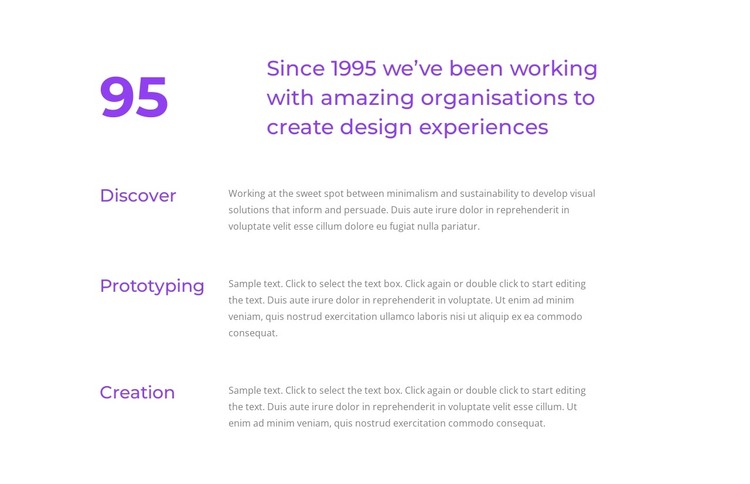
The heading about working with organisations to create design experiences gives the block a broad service context, and the large numeric marker adds a strong visual entry point beside it. The content then resolves into three repeated rows: Discover, Prototyping, and Creation. Their labels remain aligned opposite supporting paragraphs, allowing the section to explain several categories without turning them into unrelated cards. The Discover paragraph refers to minimalism, sustainability, and visual solutions, while the repeated row pattern provides the same reading framework for the remaining categories.
For a WordPress-managed page, this makes the block suitable as stable services or process content that can sit within a larger site structure. Its value comes from the organized relationship between the introductory message and the three named areas, not from any assumed blog or post functionality. The white background and purple type establish a recognizable section style, while muted gray text and generous vertical spacing keep the descriptions subordinate to their labels. Other WordPress-managed content can surround this region, but the block itself remains a focused, reusable presentation of design categories that can support an About or services context.
Customize with Nicepage
Open this ready-made template in the WordPress Website Builder and customize it visually in the Nicepage editor. Replace demo content, edit page sections, and adapt the design to your project without rebuilding the template from scratch.
Edit Template Offline
2. Create a new page or select existing
3. Click Add new block, search for id 1481519 and click enter
Edit Template Online
Create Awesome Websites


Free Nicepage Builder
Keywords
Manage and Edit This Theme in WordPress
Customize and Install the WordPress Theme
Start with this ready-made theme instead of building the WordPress design from scratch. Customize its layout, content, typography, images, sections, and other design elements visually in Nicepage editor, then export and install the WordPress Theme, Plugin, and Pages on your WordPress site. The Nicepage WordPress Plugin lets you continue working with the site after installation.
Edit the Theme Directly in WordPress
After installation, you can edit the WordPress Theme directly in WordPress with the Nicepage WordPress Plugin. Use Site Style to customize site Colors, Fonts, Header, Footer, Blog, and Post Page Templates while working within your WordPress website.
Edit WordPress Pages Visually
Use the Nicepage WordPress Plugin to edit page content directly from the WordPress admin area. Open a WordPress Page with Nicepage and visually change its text, images, sections, and other page elements while continuing to manage the Page through WordPress.
WordPress Content and Theme Integration
Use the customized theme with WordPress Pages, Posts, Blog and Post Templates, menus, widgets, and other CMS-managed content. Shared theme elements such as Colors, Fonts, Header, Footer, Blog, and Post Page Templates can be managed as part of the overall site design, while WordPress provides the CMS environment for managing site content.
This workflow combines a ready-made WordPress Theme with visual customization, direct theme editing in WordPress, and continued content management through the Nicepage WordPress Plugin.