Dictionary Translation Agency Template


Edit Template Offline
2. Create new page and search for id 6653528
Edit Template Online
Create Awesome Websites


Free Nicepage Builder
Keywords
Six Service Categories Paired With Sector Localization
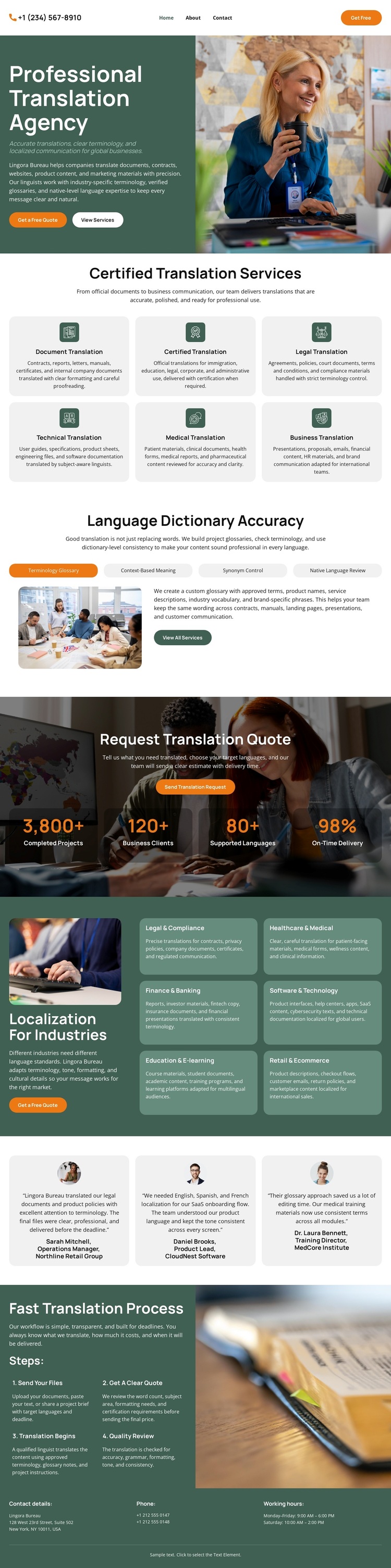
The design's strongest point is the way it covers both broad translation needs and industry-specific localization within one page. The first six cards identify document, certified, legal, technical, medical, and business translation, giving the visitor a quick view of the core offering. Later, the localization grid shifts the emphasis toward legal and compliance, healthcare and medical, finance and banking, software and technology, education and e-learning, and retail and ecommerce. That pairing makes the design suitable for projects that need more than a generic language-services introduction.
The visual story is supported by photography of translators and language-related workspaces, while the accuracy sections add explanatory context between the repeated card groups. Three testimonial cards provide a separate feedback area, and the three-step process gives the page a practical closing structure. The quote actions keep the design connected to an inquiry-oriented use case without overwhelming the informational sections. As a ready-made option, it is especially useful when a project needs to show service breadth, demonstrate sector relevance, explain quality, and lead interested visitors toward a translation quote. The displayed figures and sample contact details should be replaced with independently verified information before the design is used for a real agency.
Customize with Nicepage
Open this ready-made template in the Template Builder and customize it visually in the Nicepage editor. Replace demo content, edit page sections, and adapt the design to your project without rebuilding the template from scratch.
Start With a Ready-Made Template
Choose a Design for a New Page
Use a ready-made template as a starting point instead of creating every page from a blank canvas. When adding a new page in Nicepage, browse available designs, compare different layouts, and choose an option that already fits the general purpose and visual direction of your project.
Browse Different Page Designs
Explore Page Designs using search, thematic categories, Design Sets, and full-page previews. The collection includes layouts for different subjects and page purposes, making it easier to compare alternatives before selecting a design to customize.
Customize the Selected Template
After choosing a design, create the page and continue editing it visually in Nicepage. Replace the demo content, adjust images, typography, colors, sections, and other elements, and adapt the ready-made layout to your own content instead of rebuilding the design from the beginning.
Explore More Design Directions
If the first option does not match your project closely enough, return to the design collection and compare other templates before committing to a layout. This makes the template library useful not only for faster page creation, but also for exploring different visual approaches and finding a suitable starting point for a new project.
This workflow gives you access to a broad collection of ready-made designs that can be selected, compared, and customized according to the needs of each new page or project.