Music Festivals Template


Edit Template Offline
2. Create new page and search for id 21755
Edit Template Online
Create Awesome Websites


Free Nicepage Builder
Keywords
Featured Festivals Turn the Page Into a Visual Event Guide
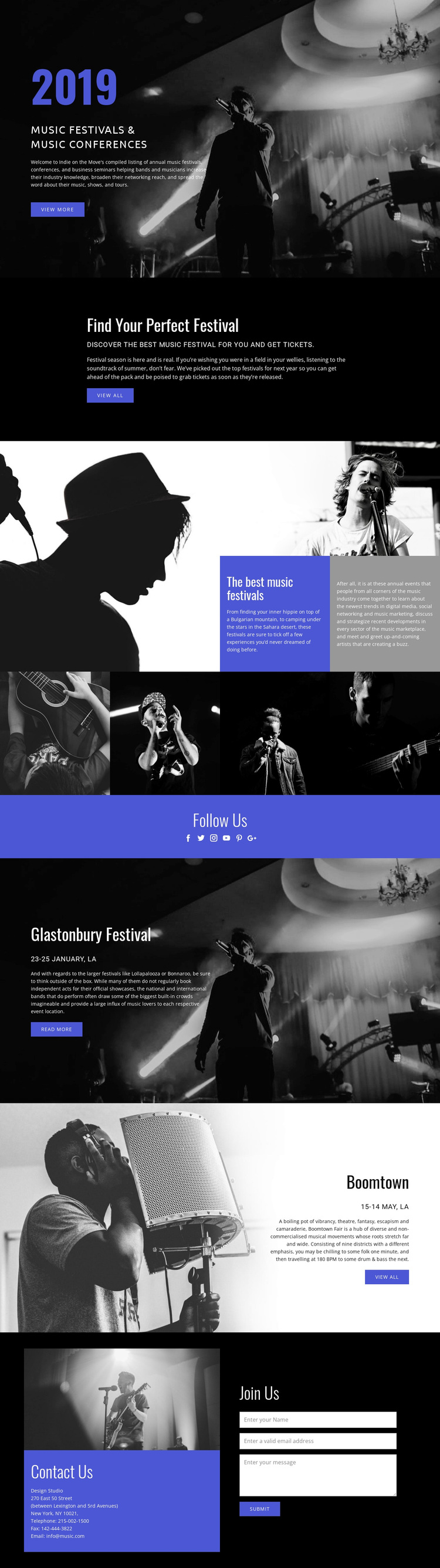
The strongest reason to choose this design is the way it makes music imagery carry the opening message. A large monochrome concert photograph supports the Music Festivals & Music Conferences heading, so the subject is understood before visitors read the supporting description. The compact Find Your Perfect Festival section then provides a clear content bridge from general interest to the act of exploring events.
The page covers several complementary types of festival content without becoming a plain directory. The split presentation places dramatic musician photographs beside contrasting editorial text panels, giving the guide both atmosphere and explanatory space. A four-image horizontal gallery extends that visual emphasis, while the Glastonbury Festival and Boomtown panels show how individual festival entries can receive their own image, date line, description, and action.
Social and contact content complete the choice. Six social-network links create a visible Follow Us destination, and the closing Contact Us block combines an indigo contact-information panel with a Join Us form. That range makes the design suitable for projects that need to present music events through photography, featured examples, discovery prompts, and a direct communication point. Its value lies in this specific balance of editorial guide content and visual festival storytelling, not in a generic claim of broad website flexibility.
Customize with Nicepage
Open this ready-made template in the Template Builder and customize it visually in the Nicepage editor. Replace demo content, edit page sections, and adapt the design to your project without rebuilding the template from scratch.
Start With a Ready-Made Template
Choose a Design for a New Page
Use a ready-made template as a starting point instead of creating every page from a blank canvas. When adding a new page in Nicepage, browse available designs, compare different layouts, and choose an option that already fits the general purpose and visual direction of your project.
Browse Different Page Designs
Explore Page Designs using search, thematic categories, Design Sets, and full-page previews. The collection includes layouts for different subjects and page purposes, making it easier to compare alternatives before selecting a design to customize.
Customize the Selected Template
After choosing a design, create the page and continue editing it visually in Nicepage. Replace the demo content, adjust images, typography, colors, sections, and other elements, and adapt the ready-made layout to your own content instead of rebuilding the design from the beginning.
Explore More Design Directions
If the first option does not match your project closely enough, return to the design collection and compare other templates before committing to a layout. This makes the template library useful not only for faster page creation, but also for exploring different visual approaches and finding a suitable starting point for a new project.
This workflow gives you access to a broad collection of ready-made designs that can be selected, compared, and customized according to the needs of each new page or project.