Event Agency Template


Edit Template Offline
2. Create new page and search for id 17311
Edit Template Online
Create Awesome Websites


Free Nicepage Builder
Keywords
Three Production Services Connect the Agency Story to Contact
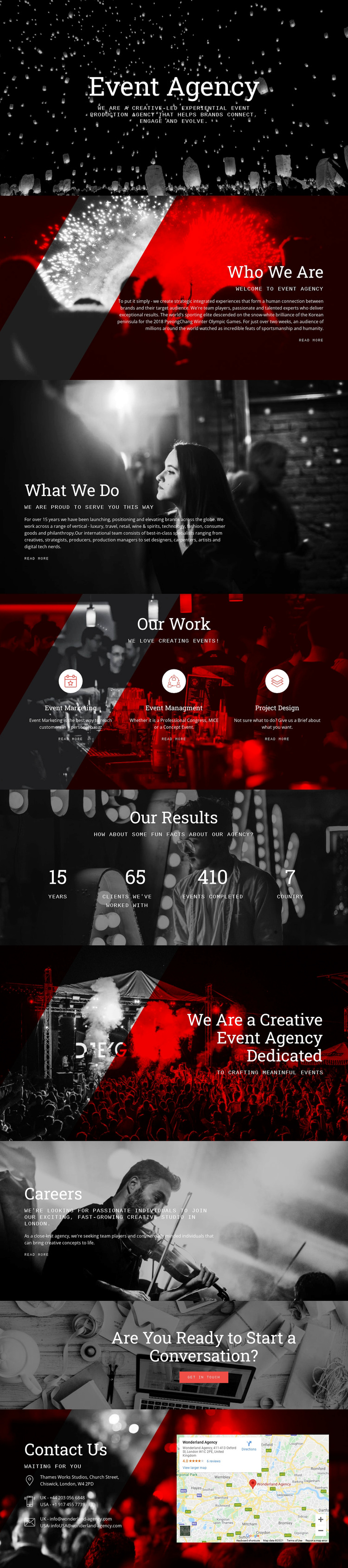
The combination of image-led storytelling and concrete agency content makes this design a distinctive option for event production projects. The hero establishes an experiential atmosphere immediately, while Who We Are and What We Do provide enough explanatory space to connect that atmosphere with the organization’s capabilities. The visual treatment is not limited to a generic services layout: monochrome event photography, dramatic overlays, serif headings, and monospaced supporting text make the agency story feel editorial and cinematic.
The central Our Work section gives the design practical content coverage through three peer categories: Event Marketing, Event Management, and Project Design. That grouping can suit an agency that needs to explain related stages or disciplines without making one service appear to be the entire offer. The page also references sectors such as luxury, travel, retail, technology, fashion, consumer goods, and philanthropy, giving the design a broader experiential context.
Further sections extend the choice beyond service presentation. Our Results supplies a dedicated proof area, Careers introduces recruitment content, and the creative statement reinforces the positioning before the final conversation prompt. The Contact Us block then combines details with a map. This balance of atmosphere, service explanation, sector coverage, agency context, and response content makes the template worth considering when a project needs more than a simple portfolio grid.
Customize with Nicepage
Open this ready-made template in the Template Builder and customize it visually in the Nicepage editor. Replace demo content, edit page sections, and adapt the design to your project without rebuilding the template from scratch.
Start With a Ready-Made Template
Choose a Design for a New Page
Use a ready-made template as a starting point instead of creating every page from a blank canvas. When adding a new page in Nicepage, browse available designs, compare different layouts, and choose an option that already fits the general purpose and visual direction of your project.
Browse Different Page Designs
Explore Page Designs using search, thematic categories, Design Sets, and full-page previews. The collection includes layouts for different subjects and page purposes, making it easier to compare alternatives before selecting a design to customize.
Customize the Selected Template
After choosing a design, create the page and continue editing it visually in Nicepage. Replace the demo content, adjust images, typography, colors, sections, and other elements, and adapt the ready-made layout to your own content instead of rebuilding the design from the beginning.
Explore More Design Directions
If the first option does not match your project closely enough, return to the design collection and compare other templates before committing to a layout. This makes the template library useful not only for faster page creation, but also for exploring different visual approaches and finding a suitable starting point for a new project.
This workflow gives you access to a broad collection of ready-made designs that can be selected, compared, and customized according to the needs of each new page or project.