Business strategy agency Website Template


A Reusable About Pattern for Identity and Activity Content
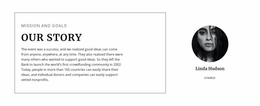
The block defines one stable website content area: a two-slide introduction that separates “Who We Are” from “What We Do.” That distinction can be useful in a broader website project because it gives identity and activity statements a shared home without requiring them to become separate pages. Each slide repeats the same relationship between text and portrait imagery, making the section easy to recognize when it appears alongside other content areas. The “read more” button on each view provides a consistent route toward deeper information.
The carousel controls preserve the section’s compact footprint while allowing both messages to occupy the same visual region. Previous and next arrows support direct exploration, and indicator dots show that the content is a limited sequence. The muted blue-gray field, serif headings, black typography, monochrome portraits, and thin outlined buttons provide visual cues that a wider website project could coordinate with related sections. In a Website Template context, the block is best understood as one reusable about component within a larger collection of pages and sections. Other content areas can handle services, proof, contact information, or detailed explanations, while this block retains its focused role of introducing organizational identity and activity through a portrait-led carousel.
Customize with Nicepage
Open this ready-made template in the Website Template Builder and customize it visually in the Nicepage editor. Replace demo content, edit page sections, and adapt the design to your project without rebuilding the template from scratch.
Edit Template Offline
2. Create a new page or select existing
3. Click Add new block, search for id 79260 and click enter
Edit Template Online
Create Awesome Websites


Free Nicepage Builder
Keywords
Use This Block in a Broader Website Template Project
Treat the Block as One Reusable Site Section
A website project is assembled from multiple pages and sections. The analyzed block provides one reusable content area—such as services, About, testimonials, pricing, gallery, team, or contact—while the rest of the site supplies other page-level functions.
Coordinate the Section With Other Pages
Use the Pages panel to manage the pages of the broader project. The block can remain one consistent section pattern while related pages add deeper information or different content without implying that the Block ID itself contains those pages.
Expand With Matching Designs
When additional pages or sections are needed, Page Design Sets can help locate matching Page and Block Designs. This can extend the visual direction around the existing block while keeping the site's other content areas separate.
This workflow treats the block as a reusable building unit inside a larger Website Template project, not as a complete website foundation on its own.