Women’s Quran Classes Website Template


Edit Template Offline
2. Create new page and search for id 6659963
Edit Template Online
Create Awesome Websites


Free Nicepage Builder
Keywords
Program, Schedule, and Learning Areas Establish a Website Foundation
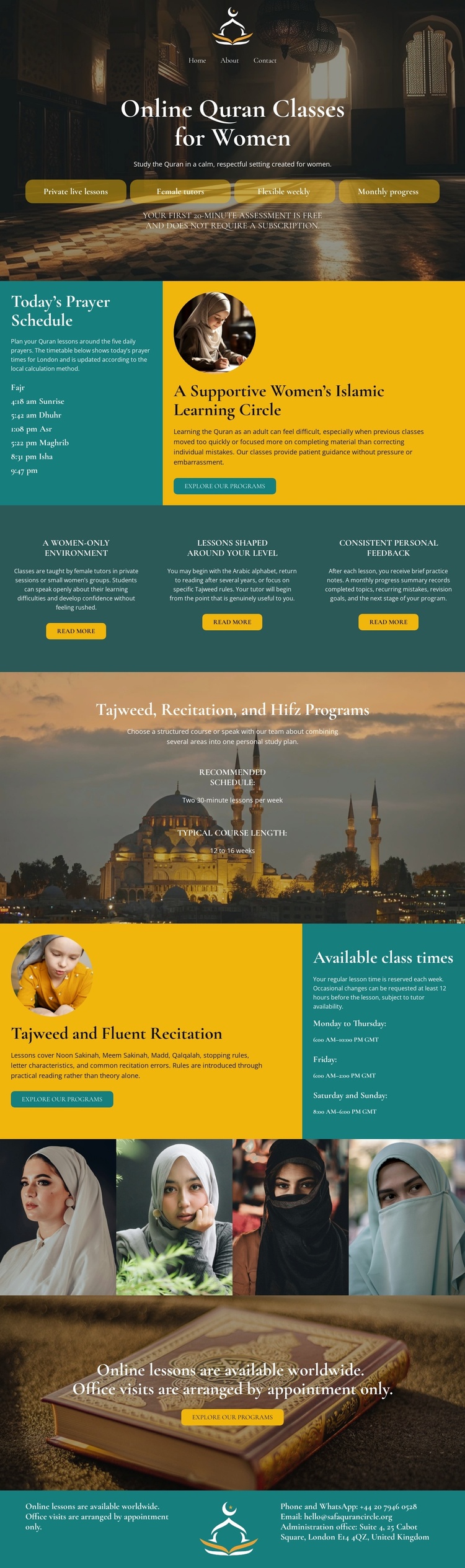
The design already defines several major content areas that a broader Quran education website could build around. The opening section introduces the women’s online class offering and provides the first enrollment actions. The prayer schedule creates a practical information category, while the three feature statements establish recurring messages about environment, lesson suitability, and personal feedback. These are useful foundations because they separate the program’s subject, daily context, and learner support instead of presenting one undifferentiated block of text.
The named Tajweed, recitation, and Hifz programs provide another clear content category. The following class-time section connects those offerings with availability information, and its teal timetable panel gives practical scheduling content a recognizable place in the visual system. The four-portrait strip can support an “about the learning community” direction, although the analysis verifies portraits only and does not verify identities, testimonials, or staff roles.
For a wider project, the current page could therefore act as a foundation for related program or information pages while retaining its mosque imagery, teal and gold accents, serif headings, and rounded action buttons. That is an expansion opportunity, not a claim that additional pages already exist. The value of the template lies in the content categories and recurring visual rules it establishes before a larger site structure is added.
Customize with Nicepage
Open this ready-made template in the Website Template Builder and customize it visually in the Nicepage editor. Replace demo content, edit page sections, and adapt the design to your project without rebuilding the template from scratch.
Build a Complete Website From This Template
Customize the Website Visually
Use this ready-made website template as a starting point for your project and adapt its pages visually in Nicepage. Change content, images, typography, navigation, sections, and other design elements while keeping the website together as a single editable project.
Manage Website Pages in One Project
Use the Pages panel to open, add, duplicate, and manage the pages of your website. Work on individual pages while keeping navigation and the overall site structure accessible from the same project, making it easier to develop a complete website instead of managing separate page files.
Expand the Website With Matching Designs
When you need additional pages or sections, use Page Design Sets to find Page and Block Designs created in the same visual style. Design Sets group matching designs together, making it easier to expand the website with new content while maintaining a consistent look across its pages and sections.
Organize Larger Multi-Page Websites
As the website grows, use Page Folders to organize related pages and keep larger multi-page projects easier to navigate in the editor. This is especially useful for websites with separate service pages, company information, contacts, landing pages, and other content areas.
This workflow makes the template a practical foundation for building and expanding a complete website while managing its pages, content, and visual design within one Nicepage project.