Share your feedback Website Template


Activity Choices Turn a Feedback Card Into a Reusable Team Section
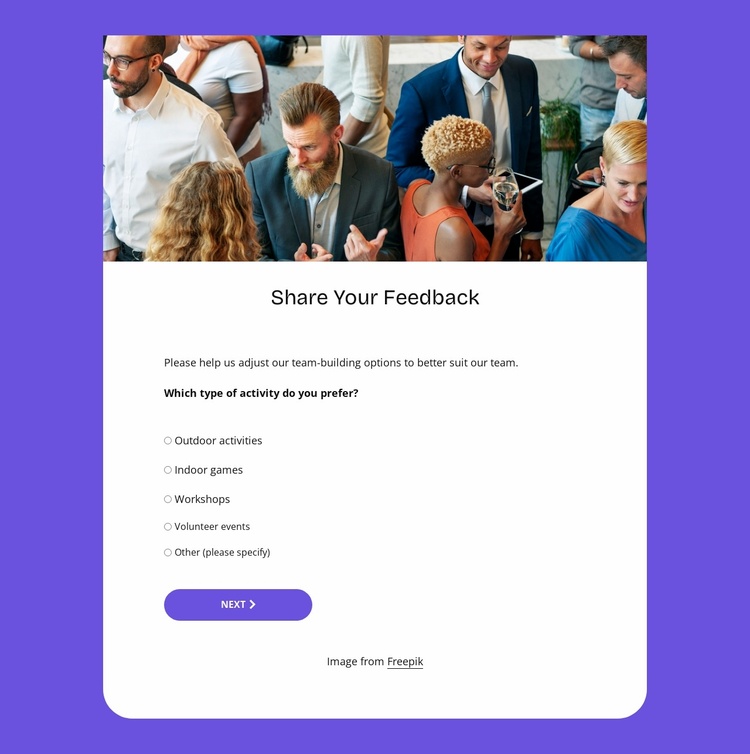
The group dining photograph gives this section an immediate human context, while the “Share Your Feedback” heading and introduction explain why visitors are being asked to respond. Below that opening, the centered white card keeps the questionnaire contained as one recognizable content area. The purple surrounding background, rounded lower corners, and generous white space distinguish the survey from neighboring sections without requiring a larger page structure.
Its two-step organization makes the block suitable for a recurring feedback area in a broader website project. The first step concentrates on activity selection, presenting outdoor activities, indoor games, workshops, and volunteer events as radio-choice options. Later questions extend the content model by asking how often participants would join and whether they prefer in-person, virtual, or hybrid formats. The Next control divides these related decisions into a manageable sequence, while Submit marks the end of the response path.
Within a wider website project, this reusable section could support team-building information, internal engagement, or an event-related feedback journey, with other blocks handling introductions, detailed activity descriptions, or follow-up information. Nicepage’s Page Basics documentation describes managing pages and their blocks, which is relevant when coordinating this questionnaire with other content areas without treating the block itself as a complete site.
Customize with Nicepage
Open this ready-made template in the Website Template Builder and customize it visually in the Nicepage editor. Replace demo content, edit page sections, and adapt the design to your project without rebuilding the template from scratch.
Edit Template Offline
2. Create a new page or select existing
3. Click Add new block, search for id 6537001 and click enter
Edit Template Online
Create Awesome Websites


Free Nicepage Builder
Keywords
Build a Complete Website From This Template
Customize the Website Visually
Use this ready-made website template as a starting point for your project and adapt its pages visually in Nicepage. Change content, images, typography, navigation, sections, and other design elements while keeping the website together as a single editable project.
Manage Website Pages in One Project
Use the Pages panel to open, add, duplicate, and manage the pages of your website. Work on individual pages while keeping navigation and the overall site structure accessible from the same project, making it easier to develop a complete website instead of managing separate page files.
Expand the Website With Matching Designs
When you need additional pages or sections, use Page Design Sets to find Page and Block Designs created in the same visual style. Design Sets group matching designs together, making it easier to expand the website with new content while maintaining a consistent look across its pages and sections.
Organize Larger Multi-Page Websites
As the website grows, use Page Folders to organize related pages and keep larger multi-page projects easier to navigate in the editor. This is especially useful for websites with separate service pages, company information, contacts, landing pages, and other content areas.
This workflow makes the template a practical foundation for building and expanding a complete website while managing its pages, content, and visual design within one Nicepage project.