Flexible plans for every client Website Template


A Reusable Pricing Pattern for Broader Website Content
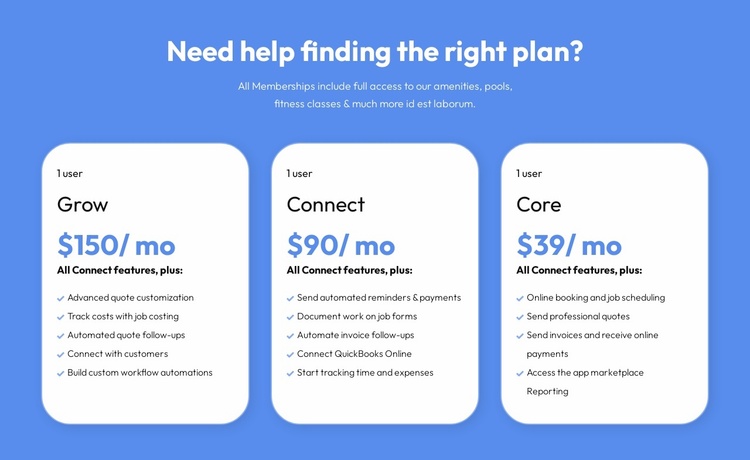
The section defines one stable content area for plan comparison: an introductory question and paragraph lead into three parallel cards named Grow, Connect, and Core. Each card carries a one-user label, a monthly price, and a feature list, so the arrangement can be reused as a recognizable pricing pattern within a larger website project. The displayed prices are $150 per month for Grow, $90 for Connect, and $39 for Core. Grow and Connect each show five included features, while Core shows four, including Reporting in its final entry.
The block is visually self-contained without becoming a complete site structure. Its blue full-width background can mark the pricing area as a distinct section, and the white rounded cards give each plan a consistent surface that can be coordinated with other blocks. Blue price text provides a repeated emphasis treatment, while check marks make the feature lists easy to scan. In a broader website template project, this section could sit alongside other content areas that explain services, company information, or contact options. The surrounding project supplies those additional roles; this block contributes a focused and repeatable way to present subscription choices and their included features.
Customize with Nicepage
Open this ready-made template in the Website Template Builder and customize it visually in the Nicepage editor. Replace demo content, edit page sections, and adapt the design to your project without rebuilding the template from scratch.
Edit Template Offline
2. Create a new page or select existing
3. Click Add new block, search for id 6501199 and click enter
Edit Template Online
Create Awesome Websites


Free Nicepage Builder
Keywords
Use This Block in a Broader Website Template Project
Treat the Block as One Reusable Site Section
A website project is assembled from multiple pages and sections. The analyzed block provides one reusable content area—such as services, About, testimonials, pricing, gallery, team, or contact—while the rest of the site supplies other page-level functions.
Coordinate the Section With Other Pages
Use the Pages panel to manage the pages of the broader project. The block can remain one consistent section pattern while related pages add deeper information or different content without implying that the Block ID itself contains those pages.
Expand With Matching Designs
When additional pages or sections are needed, Page Design Sets can help locate matching Page and Block Designs. This can extend the visual direction around the existing block while keeping the site's other content areas separate.
This workflow treats the block as a reusable building unit inside a larger Website Template project, not as a complete website foundation on its own.