3 Days only sale Website Template


A Reusable Campaign Section With a Stable Message Pattern
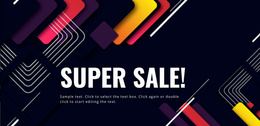
The block provides one clearly defined website content area: a centered sale announcement organized around timing, event name, and discount value. The “2 days only” line can introduce the campaign window, “super sale” identifies the promotion, and “up to 70% discount” states the offer detail. This stable three-line pattern makes the section easy to recognize when it is placed alongside other content areas that explain products, services, or purchase steps.
Its visual treatment gives the pattern a strong campaign identity. A full-width decorative image uses deep navy and purple as the background, with colorful abstract confetti shapes surrounding the high-contrast pink, white, and orange typography. Generous space around the centered text prevents the block from reading like a dense information panel. In a broader website project, these choices can become a visual cue for seasonal or time-limited promotions while other sections use their own content roles.
The section is especially suitable where a project needs a reusable promotional interruption between more detailed areas. It can introduce a campaign before product information, reinforce an offer near a response area, or provide a distinct sale message within a continuous site journey. The block contributes a prepared content and visual pattern; the surrounding website supplies the broader project structure and any supporting pages or actions.
Customize with Nicepage
Open this ready-made template in the Website Template Builder and customize it visually in the Nicepage editor. Replace demo content, edit page sections, and adapt the design to your project without rebuilding the template from scratch.
Edit Template Offline
2. Create a new page or select existing
3. Click Add new block, search for id 63372 and click enter
Edit Template Online
Create Awesome Websites


Free Nicepage Builder
Keywords
Use This Block in a Broader Website Template Project
Treat the Block as One Reusable Site Section
A website project is assembled from multiple pages and sections. The analyzed block provides one reusable content area—such as services, About, testimonials, pricing, gallery, team, or contact—while the rest of the site supplies other page-level functions.
Coordinate the Section With Other Pages
Use the Pages panel to manage the pages of the broader project. The block can remain one consistent section pattern while related pages add deeper information or different content without implying that the Block ID itself contains those pages.
Expand With Matching Designs
When additional pages or sections are needed, Page Design Sets can help locate matching Page and Block Designs. This can extend the visual direction around the existing block while keeping the site's other content areas separate.
This workflow treats the block as a reusable building unit inside a larger Website Template project, not as a complete website foundation on its own.