Development services Website Template


Six-card service content works as a reusable website section
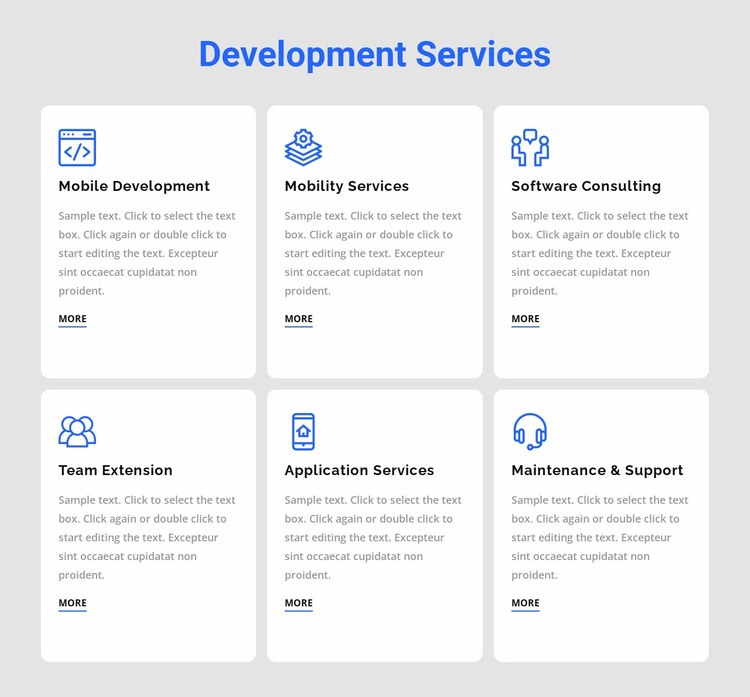
The block defines one stable content area for a broader website project: a development services overview with six parallel offerings. The centered heading introduces the subject, while the three-column, two-row grid keeps Mobile Development, Mobility Services, Software Consulting, Team Extension, Application Services, and Maintenance & Support together as one recognizable section. Other pages or blocks can handle introductions, detailed case studies, testimonials, contact information, or additional service explanations around it.
Its repeatable card structure makes the section practical to coordinate with related content. Every card combines a line icon, service title, descriptive paragraph, and “more” link, giving each offering the same amount of visual attention and a comparable route toward deeper information. White rounded surfaces distinguish the cards from the light gray section background, while blue heading and icon accents can become visual cues for related service or feature areas elsewhere in the project.
The block therefore contributes a defined pattern rather than a complete website architecture. It can be reused as the main services area on an appropriate page or adapted as a reference for similar grouped content, while surrounding pages provide the broader project structure. Its strength is the combination of clear service coverage, consistent card internals, and a layout that remains easy to recognize as one section.
Customize with Nicepage
Open this ready-made template in the Website Template Builder and customize it visually in the Nicepage editor. Replace demo content, edit page sections, and adapt the design to your project without rebuilding the template from scratch.
Edit Template Offline
2. Create a new page or select existing
3. Click Add new block, search for id 473267 and click enter
Edit Template Online
Create Awesome Websites


Free Nicepage Builder
Keywords
Use This Block in a Broader Website Template Project
Treat the Block as One Reusable Site Section
A website project is assembled from multiple pages and sections. The analyzed block provides one reusable content area—such as services, About, testimonials, pricing, gallery, team, or contact—while the rest of the site supplies other page-level functions.
Coordinate the Section With Other Pages
Use the Pages panel to manage the pages of the broader project. The block can remain one consistent section pattern while related pages add deeper information or different content without implying that the Block ID itself contains those pages.
Expand With Matching Designs
When additional pages or sections are needed, Page Design Sets can help locate matching Page and Block Designs. This can extend the visual direction around the existing block while keeping the site's other content areas separate.
This workflow treats the block as a reusable building unit inside a larger Website Template project, not as a complete website foundation on its own.