Amazing performace of art Website Template


Edit Template Offline
2. Create new page and search for id 32116
Edit Template Online
Create Awesome Websites


Free Nicepage Builder
Keywords
Release, Festival, and Party Sections Form a Site Foundation
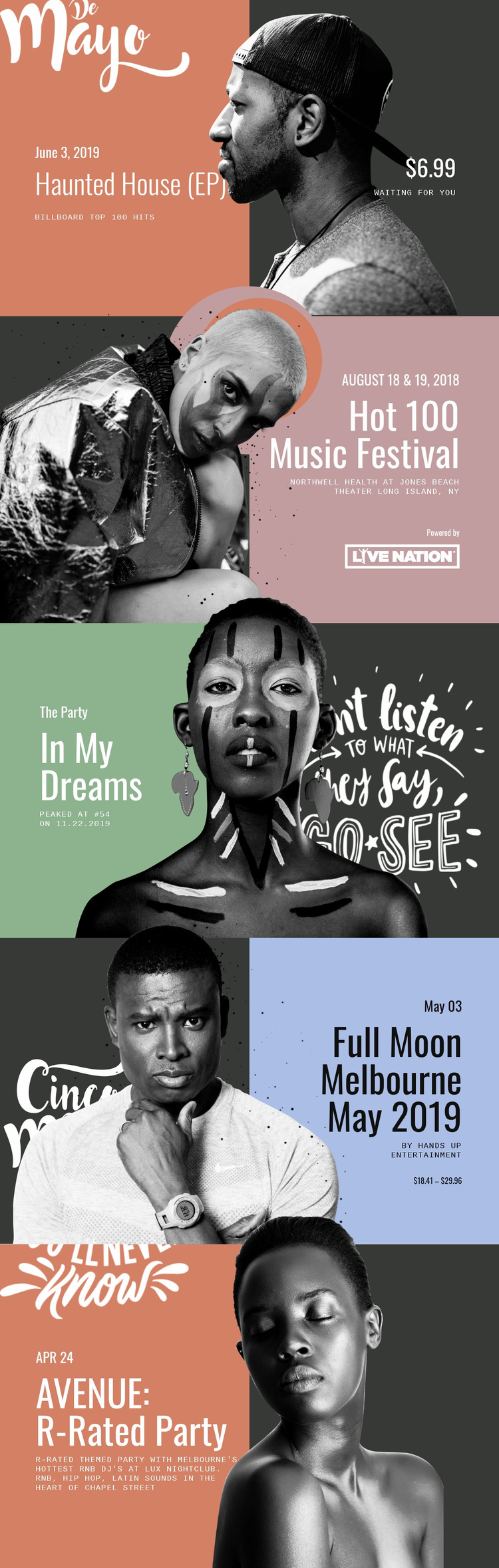
Haunted House (EP), Hot 100 Music Festival, In My Dreams, Full Moon Melbourne May 2019, and AVENUE: R-Rated Party give the design several established content categories for a broader music website project. The first and third panels focus on recorded music and chart context, while the remaining sections present festivals or nightlife events. That range makes the page more than a single promotional message: it suggests a starting structure for presenting releases alongside appearances and event programming.
The repeated split arrangement creates a visual relationship that can support additional site areas. Each panel pairs a portrait or performer image with a compact information group, so future pages could follow the same distinction between visual introduction and supporting details. Dates, venues, organizers, ticket ranges, music styles, and outbound information links already demonstrate the kinds of content the design can accommodate, without proving that additional pages are included.
The black-and-white portraits and colored fields provide a consistent direction for extending the project. A larger site could use the release-oriented sections for music information and the event-oriented sections for performance or party updates, while retaining the tall editorial character established by this template.
Customize with Nicepage
Open this ready-made template in the Website Template Builder and customize it visually in the Nicepage editor. Replace demo content, edit page sections, and adapt the design to your project without rebuilding the template from scratch.
Build a Complete Website From This Template
Customize the Website Visually
Use this ready-made website template as a starting point for your project and adapt its pages visually in Nicepage. Change content, images, typography, navigation, sections, and other design elements while keeping the website together as a single editable project.
Manage Website Pages in One Project
Use the Pages panel to open, add, duplicate, and manage the pages of your website. Work on individual pages while keeping navigation and the overall site structure accessible from the same project, making it easier to develop a complete website instead of managing separate page files.
Expand the Website With Matching Designs
When you need additional pages or sections, use Page Design Sets to find Page and Block Designs created in the same visual style. Design Sets group matching designs together, making it easier to expand the website with new content while maintaining a consistent look across its pages and sections.
Organize Larger Multi-Page Websites
As the website grows, use Page Folders to organize related pages and keep larger multi-page projects easier to navigate in the editor. This is especially useful for websites with separate service pages, company information, contacts, landing pages, and other content areas.
This workflow makes the template a practical foundation for building and expanding a complete website while managing its pages, content, and visual design within one Nicepage project.