International language school Website Template


Edit Template Offline
2. Create new page and search for id 18696
Edit Template Online
Create Awesome Websites


Free Nicepage Builder
Keywords
Course, Support, and Enrollment Areas Establish a Website Foundation
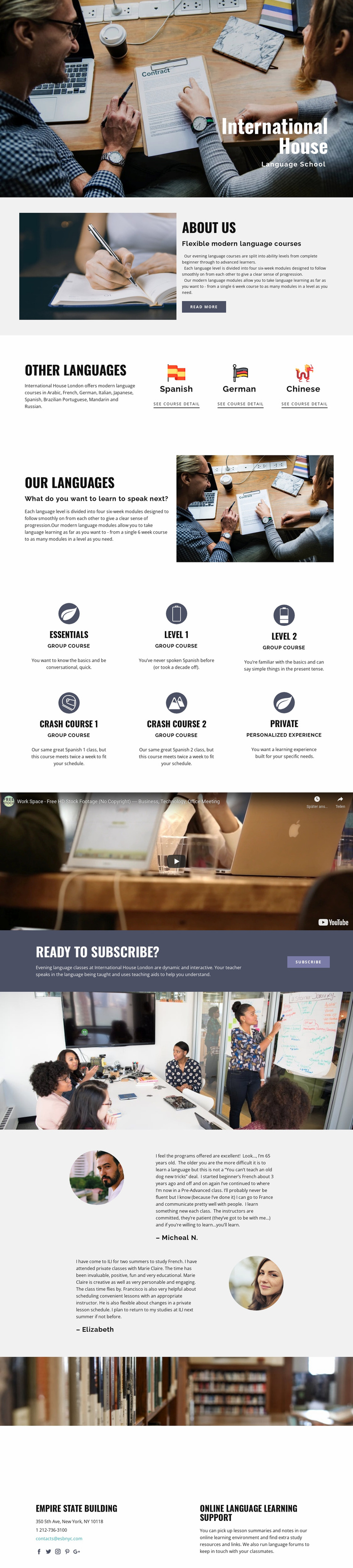
The design already defines several major content areas that a larger language education project could build around. The hero and about section establish the school’s identity and explain flexible evening courses, while the language-choice and program sections provide a basis for organizing offerings by language and learning path. The verified level structure—four six-week modules within each level—also gives the project a clear content relationship for future course information.
The six course descriptions broaden that foundation beyond a single class announcement. Essentials, crash courses, group learning, and personalized private study represent different ways visitors may engage with the school. The video creates a separate learning-media area, and the testimonials provide a place for learner experiences. These sections can help define future content categories without claiming that additional pages already exist in the template.
The lower part of the design supports project expansion in another direction. The enrollment callout supplies a clear response area, while the final contact block combines communication channels with online language learning support. Lesson summaries, notes, study materials, and forums are verified as support resources, so they can inform future site planning around course participation and continuing study. The result is more than a styled homepage: it is a starting information structure for a broader education project, with visible relationships between courses, learners, enrollment, and ongoing support.
Customize with Nicepage
Open this ready-made template in the Website Template Builder and customize it visually in the Nicepage editor. Replace demo content, edit page sections, and adapt the design to your project without rebuilding the template from scratch.
Build a Complete Website From This Template
Customize the Website Visually
Use this ready-made website template as a starting point for your project and adapt its pages visually in Nicepage. Change content, images, typography, navigation, sections, and other design elements while keeping the website together as a single editable project.
Manage Website Pages in One Project
Use the Pages panel to open, add, duplicate, and manage the pages of your website. Work on individual pages while keeping navigation and the overall site structure accessible from the same project, making it easier to develop a complete website instead of managing separate page files.
Expand the Website With Matching Designs
When you need additional pages or sections, use Page Design Sets to find Page and Block Designs created in the same visual style. Design Sets group matching designs together, making it easier to expand the website with new content while maintaining a consistent look across its pages and sections.
Organize Larger Multi-Page Websites
As the website grows, use Page Folders to organize related pages and keep larger multi-page projects easier to navigate in the editor. This is especially useful for websites with separate service pages, company information, contacts, landing pages, and other content areas.
This workflow makes the template a practical foundation for building and expanding a complete website while managing its pages, content, and visual design within one Nicepage project.