Digital Art Museum Website Template


Edit Template Offline
2. Create new page and search for id 14287
Edit Template Online
Create Awesome Websites


Free Nicepage Builder
Keywords
Exhibitions, Experiences, and Editorial Coverage Define a Site Foundation
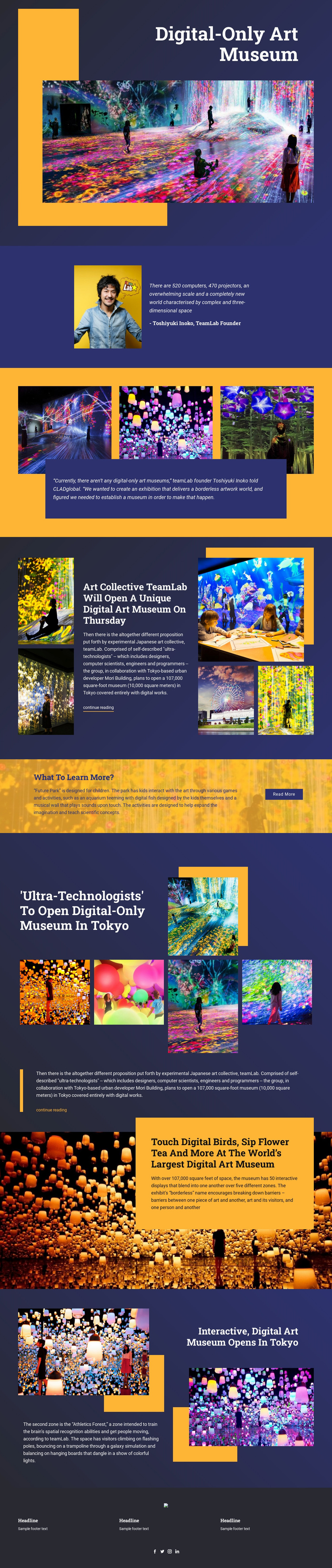
The design already identifies several major content areas that a broader digital-culture website could build around. The opening museum concept provides a clear home-page subject, while the portrait and quotation attributed to Toshiyuki Inoko add founder-related context. The three-image gallery and the later collage of five artwork images establish visual exhibition coverage, giving the project a natural area for presenting works alongside explanatory statements rather than relying only on a promotional headline.
Other sections suggest additional directions for site growth. The teamLab article and the later Tokyo museum feature show how related editorial coverage can sit beside artwork imagery and continue-reading links. Future Park introduces a children-focused experience, creating a distinct audience and educational angle, while Athletics Forest describes a zone focused on spatial recognition and movement. The immersive visitor-experience section adds another content category centered on interactive displays. These areas could inform future pages or recurring sections, but the verified analysis confirms the present design as one page rather than a complete multi-page set.
The dark navy panels, golden accents, large white headings, and image-led compositions give those content areas a shared visual foundation. Three footer information columns and social icons provide common site material at the close. As a website template, the design therefore offers an initial information architecture for a digital museum or arts organization: identity, exhibitions, editorial stories, audience-specific experiences, zone descriptions, and social connection.
Customize with Nicepage
Open this ready-made template in the Website Template Builder and customize it visually in the Nicepage editor. Replace demo content, edit page sections, and adapt the design to your project without rebuilding the template from scratch.
Build a Complete Website From This Template
Customize the Website Visually
Use this ready-made website template as a starting point for your project and adapt its pages visually in Nicepage. Change content, images, typography, navigation, sections, and other design elements while keeping the website together as a single editable project.
Manage Website Pages in One Project
Use the Pages panel to open, add, duplicate, and manage the pages of your website. Work on individual pages while keeping navigation and the overall site structure accessible from the same project, making it easier to develop a complete website instead of managing separate page files.
Expand the Website With Matching Designs
When you need additional pages or sections, use Page Design Sets to find Page and Block Designs created in the same visual style. Design Sets group matching designs together, making it easier to expand the website with new content while maintaining a consistent look across its pages and sections.
Organize Larger Multi-Page Websites
As the website grows, use Page Folders to organize related pages and keep larger multi-page projects easier to navigate in the editor. This is especially useful for websites with separate service pages, company information, contacts, landing pages, and other content areas.
This workflow makes the template a practical foundation for building and expanding a complete website while managing its pages, content, and visual design within one Nicepage project.