Beauty trends info Website Template


Edit Template Offline
2. Create new page and search for id 127169
Edit Template Online
Create Awesome Websites


Free Nicepage Builder
Keywords
Summer trends and mascara products define a broader site foundation
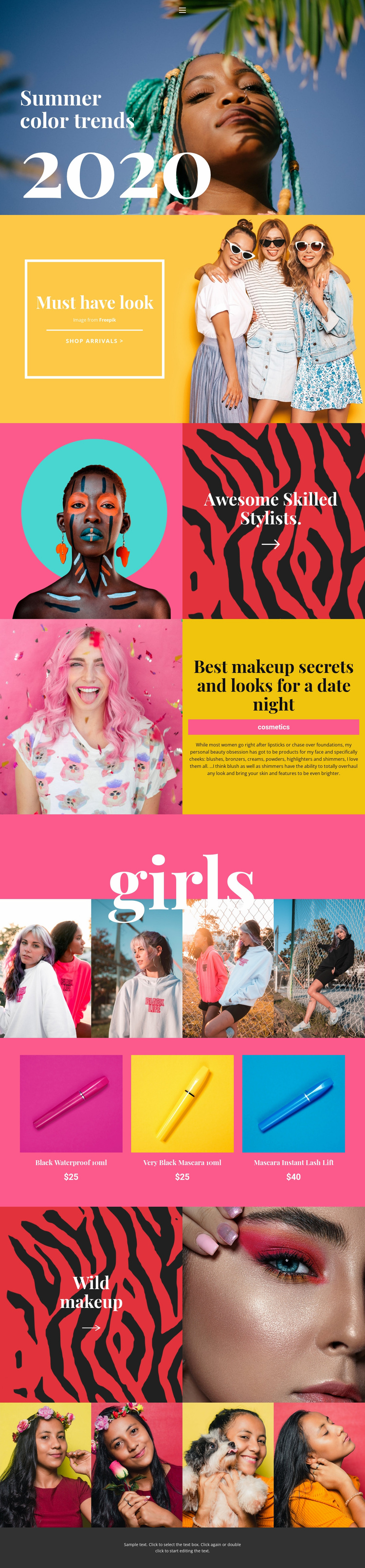
The page already establishes several major content areas that can anchor a wider beauty website. The summer color trends opening introduces the subject visually, while the “Must have look” section connects seasonal inspiration with a shop arrivals call to action. The stylist feature and date-night makeup editorial then add different kinds of supporting content: one emphasizes people and beauty expertise, while the other organizes attention around cosmetics, blushes, bronzers, and highlighters.
The two four-image galleries extend the visual side of the project, giving future pages a clear reference for presenting beauty and fashion imagery. The product list supplies another distinct area, with three mascara items—Black Waterproof 10ml, Very Black Mascara 10ml, and Mascara Instant Lash Lift—shown with prices. Together, these sections suggest a foundation that can grow around trends, inspiration, product information, and image-led collections without claiming that additional pages already exist. The navigation row is especially useful as a starting point for connecting those content categories as the site expands. A broader website project could retain the same bold pink, yellow, turquoise, red, and black visual language while developing separate destinations for editorial features, cosmetic ranges, stylist-focused content, and arrivals.
Customize with Nicepage
Open this ready-made template in the Website Template Builder and customize it visually in the Nicepage editor. Replace demo content, edit page sections, and adapt the design to your project without rebuilding the template from scratch.
Build a Complete Website From This Template
Customize the Website Visually
Use this ready-made website template as a starting point for your project and adapt its pages visually in Nicepage. Change content, images, typography, navigation, sections, and other design elements while keeping the website together as a single editable project.
Manage Website Pages in One Project
Use the Pages panel to open, add, duplicate, and manage the pages of your website. Work on individual pages while keeping navigation and the overall site structure accessible from the same project, making it easier to develop a complete website instead of managing separate page files.
Expand the Website With Matching Designs
When you need additional pages or sections, use Page Design Sets to find Page and Block Designs created in the same visual style. Design Sets group matching designs together, making it easier to expand the website with new content while maintaining a consistent look across its pages and sections.
Organize Larger Multi-Page Websites
As the website grows, use Page Folders to organize related pages and keep larger multi-page projects easier to navigate in the editor. This is especially useful for websites with separate service pages, company information, contacts, landing pages, and other content areas.
This workflow makes the template a practical foundation for building and expanding a complete website while managing its pages, content, and visual design within one Nicepage project.