Modern Korean Skincare CSS Template


Edit Template Offline
2. Create new page and search for id 6672116
Edit Template Online
Create Awesome Websites


Free Nicepage Builder
Keywords
Cream Surfaces, Circular Categories, and Editorial Product Cards
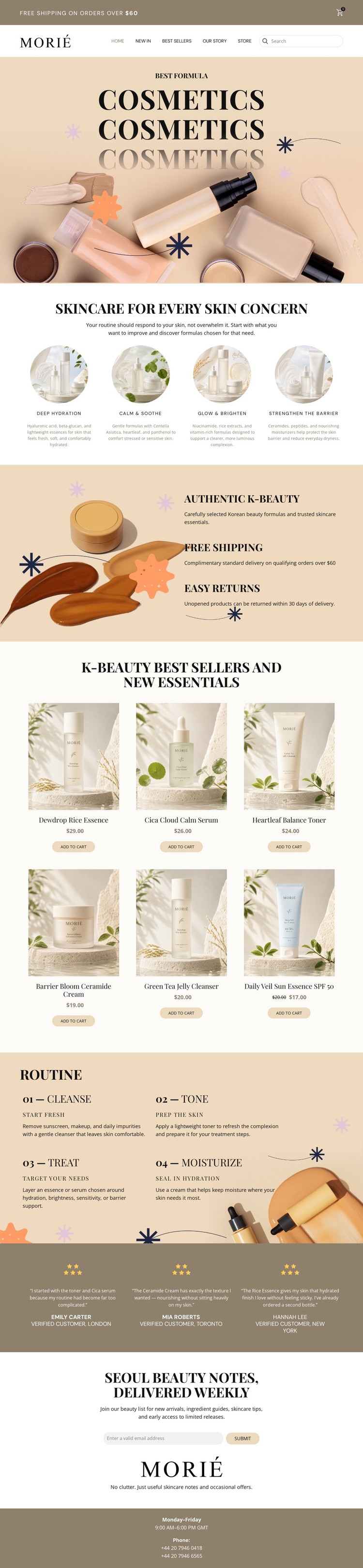
The visual system is built from warm cream and beige surfaces, muted brown emphasis areas, and black editorial typography. That restrained palette gives the product photography and botanical imagery a clear role: images carry much of the visual interest, while the surrounding space keeps the page from feeling crowded. The centered presentation also supports the storefront’s calm beauty direction without relying on heavy decorative treatment.
Repeated shapes help connect different parts of the design. The four skincare concern categories use circular visuals, while the product catalog presents six cards with consistent image, name, price, and add-to-cart relationships. Those recurring patterns make the page easier to style as a coherent CSS-oriented design rather than as unrelated sections. The promotional bar, full-width image hero, split benefits area, and muted testimonial band each change the background treatment while preserving the same editorial contrast.
The result is a set of visible rules covering color, spacing, typography, image emphasis, card structure, and accents such as the decorative starburst forms. Adjusting those properties can change the storefront’s mood or brand expression while retaining its existing product-to-routine sequence and shopping structure.
Customize with Nicepage
Open this ready-made template in the CSS Template Builder and customize it visually in the Nicepage editor. Replace demo content, edit page sections, and adapt the design to your project without rebuilding the template from scratch.
Customize This Template With CSS
Control Page-Specific Styling
Customize the visual appearance of this ready-made template directly in the Nicepage editor. Adjust typography, spacing, backgrounds, borders, colors, positioning, and other style properties using visual controls while keeping the page layout easy to manage without writing CSS manually.
Add Custom CSS When Needed
For styling requirements that go beyond the standard editor options, use Custom CSS to add targeted rules. CSS can be applied to individual elements, specific pages, or the entire website depending on the scope of the customization, while CSS classes can be used to connect custom rules with selected elements.
Export Minimal CSS Per Page
For projects where CSS size and page performance matter, Nicepage can export minimal CSS for each page. Instead of relying on one larger common stylesheet, each page can use a separate CSS file containing only the style rules required for that particular page. According to Nicepage documentation, these page-specific CSS files can be about ten times more compact, helping reduce unnecessary CSS and improve page loading performance.
This workflow combines visual styling with optional custom CSS and optimized page-specific CSS output, giving you additional control when a project requires it without making manual CSS editing the primary way to customize the template.