Building digital products CSS Template


Alternating Cards Give the Process a Clear Visual System
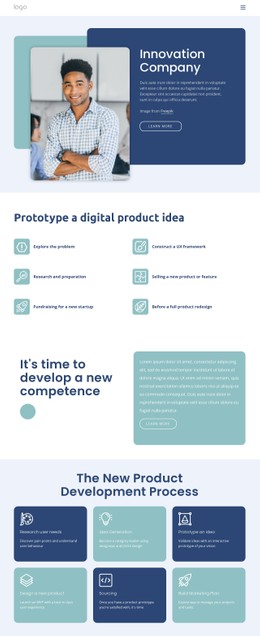
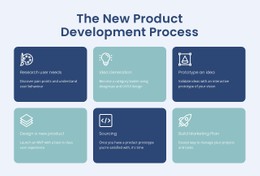
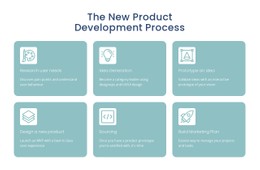
The six cards use a consistent visual recipe: a white line icon, a stage title, and supporting copy sit on either a dark navy or muted teal rounded surface. That repetition makes the process easy to style as one coordinated group while still giving each stage enough separation. The pale section background and generous gaps around the cards prevent the six items from becoming a dense, undifferentiated list.
The three-column, two-row arrangement also creates useful styling relationships. Card width, corner radius, internal padding, icon scale, title contrast, and paragraph spacing can be adjusted as a family rather than treated as unrelated pieces. The alternating colors provide a visual rhythm across the grid, while the centered dark-blue heading remains a quieter entry point above it. This makes the block a practical CSS Template reference when the goal is to refine the appearance of a real process section without changing its six-stage content model. Styling can preserve the distinction between research, idea generation, prototyping, product design, sourcing, and marketing planning while improving balance, contrast, and consistency inside the block.
Customize with Nicepage
Open this ready-made template in the CSS Template Builder and customize it visually in the Nicepage editor. Replace demo content, edit page sections, and adapt the design to your project without rebuilding the template from scratch.
Edit Template Offline
2. Create a new page or select existing
3. Click Add new block, search for id 535633 and click enter
Edit Template Online
Create Awesome Websites


Free Nicepage Builder
Keywords
Customize This Template With CSS
Control Page-Specific Styling
Customize the visual appearance of this ready-made template directly in the Nicepage editor. Adjust typography, spacing, backgrounds, borders, colors, positioning, and other style properties using visual controls while keeping the page layout easy to manage without writing CSS manually.
Add Custom CSS When Needed
For styling requirements that go beyond the standard editor options, use Custom CSS to add targeted rules. CSS can be applied to individual elements, specific pages, or the entire website depending on the scope of the customization, while CSS classes can be used to connect custom rules with selected elements.
Export Minimal CSS Per Page
For projects where CSS size and page performance matter, Nicepage can export minimal CSS for each page. Instead of relying on one larger common stylesheet, each page can use a separate CSS file containing only the style rules required for that particular page. According to Nicepage documentation, these page-specific CSS files can be about ten times more compact, helping reduce unnecessary CSS and improve page loading performance.
This workflow combines visual styling with optional custom CSS and optimized page-specific CSS output, giving you additional control when a project requires it without making manual CSS editing the primary way to customize the template.