Meet our team block CSS Template



Pink Borders and Rounded Cards Shape the Team Section
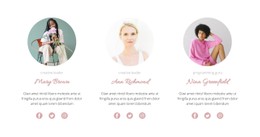
The four profile cards use a consistent visual system: white rounded surfaces, subtle shadows, circular portrait areas with pink borders, centered dark typography, and pink social icons. Behind the row, a soft pink-to-blue gradient shape creates a broad color field without disrupting the repeated card structure. These relationships are the main styling identity of the block, rather than isolated decorative details.
For a CSS Template interpretation, the useful focus is how appearance rules coordinate the same content model across all four cards. Border radius separates the portraits and cards from sharper surrounding space, while the shadow gives each profile a distinct visual boundary. The centered heading establishes the section’s alignment, and the repeated portrait, name, description, role, and social-link arrangement gives every card equal visual weight. The pink accents can guide a shared color treatment for portraits and social links, while the gradient can remain behind the row as a section-level background. Typography, alignment, spacing, and contrast can be adjusted as a coordinated visual system rather than as unrelated changes. Nicepage’s Custom CSS can provide targeted styling when standard properties are not enough, while the block’s existing profile structure remains unchanged.
Customize with Nicepage
Open this ready-made template in the CSS Template Builder and customize it visually in the Nicepage editor. Replace demo content, edit page sections, and adapt the design to your project without rebuilding the template from scratch.
Edit Template Offline
2. Create a new page or select existing
3. Click Add new block, search for id 531998 and click enter
Edit Template Online
Create Awesome Websites


Free Nicepage Builder
Keywords
Customize This Template With CSS
Control Page-Specific Styling
Customize the visual appearance of this ready-made template directly in the Nicepage editor. Adjust typography, spacing, backgrounds, borders, colors, positioning, and other style properties using visual controls while keeping the page layout easy to manage without writing CSS manually.
Add Custom CSS When Needed
For styling requirements that go beyond the standard editor options, use Custom CSS to add targeted rules. CSS can be applied to individual elements, specific pages, or the entire website depending on the scope of the customization, while CSS classes can be used to connect custom rules with selected elements.
Export Minimal CSS Per Page
For projects where CSS size and page performance matter, Nicepage can export minimal CSS for each page. Instead of relying on one larger common stylesheet, each page can use a separate CSS file containing only the style rules required for that particular page. According to Nicepage documentation, these page-specific CSS files can be about ten times more compact, helping reduce unnecessary CSS and improve page loading performance.
This workflow combines visual styling with optional custom CSS and optimized page-specific CSS output, giving you additional control when a project requires it without making manual CSS editing the primary way to customize the template.